

Introduction: Why Every Contractor Needs an SEO Audit
Your contractor website might be losing potential customers without you even knowing it. An SEO audit reveals the hidden technical problems, content weaknesses, and optimization opportunities that determine whether homeowners find your business or your competitors when searching for services.
This guide walks you through the complete process of auditing your contractor site, from technical infrastructure to content strategy. Whether you’re a roofing company, HVAC specialist, or general contractor, these steps will help you identify exactly what’s preventing your site from ranking higher and converting more leads.
You’ll learn how to use free and paid tools to analyze your site systematically, prioritize fixes based on impact, and create an action plan that delivers measurable results. Most contractors can complete a basic audit in 4-6 hours using the framework outlined here.
Key Takeaways
- SEO audits should be performed quarterly to catch technical issues, algorithm updates, and competitive changes before they significantly impact rankings and lead generation.
- Technical SEO forms the foundation of all other optimization efforts—fixing crawl errors, site speed, and mobile usability must come before content improvements.
- Local SEO elements are critical for contractors including Google Business Profile optimization, NAP consistency, location pages, and local backlinks from community organizations.
- Content audits reveal opportunities to target high-intent keywords like “emergency plumber near me” or “roof replacement cost” that drive qualified contractor leads.
- Competitor analysis uncovers gaps in your strategy by showing which keywords competitors rank for, what content formats perform best, and where backlink opportunities exist.
- Prioritization determines success—focus on high-impact, low-effort fixes first rather than trying to address every issue simultaneously, especially for small contractor teams with limited resources.
What Is an SEO Audit and Why Does It Matter for Contractors?
An SEO audit is a systematic evaluation of all factors affecting your website’s search engine visibility and performance. For contractors, this means analyzing everything from how quickly your site loads on mobile devices to whether your service area pages target the right local keywords.
The audit process differs from casual website reviews because it uses data and specialized tools to identify specific problems. You’re not guessing whether something might be wrong—you’re measuring page speed scores, crawl errors, broken links, keyword rankings, and backlink quality with precision.
Contractors who skip regular audits typically experience declining rankings without understanding why. Google’s algorithm updates, new competitors entering your market, technical issues that accumulate over time, and content that becomes outdated all erode your visibility gradually. An audit catches these problems early.
The business impact is direct and measurable. A contractor site ranking on page two for “kitchen remodeling [city name]” might generate 5 leads monthly, while the same site optimized to page one position 3-5 could generate 40-60 leads. That difference often represents hundreds of thousands in annual revenue for established contracting businesses.
How to Prepare for Your Contractor Website SEO Audit
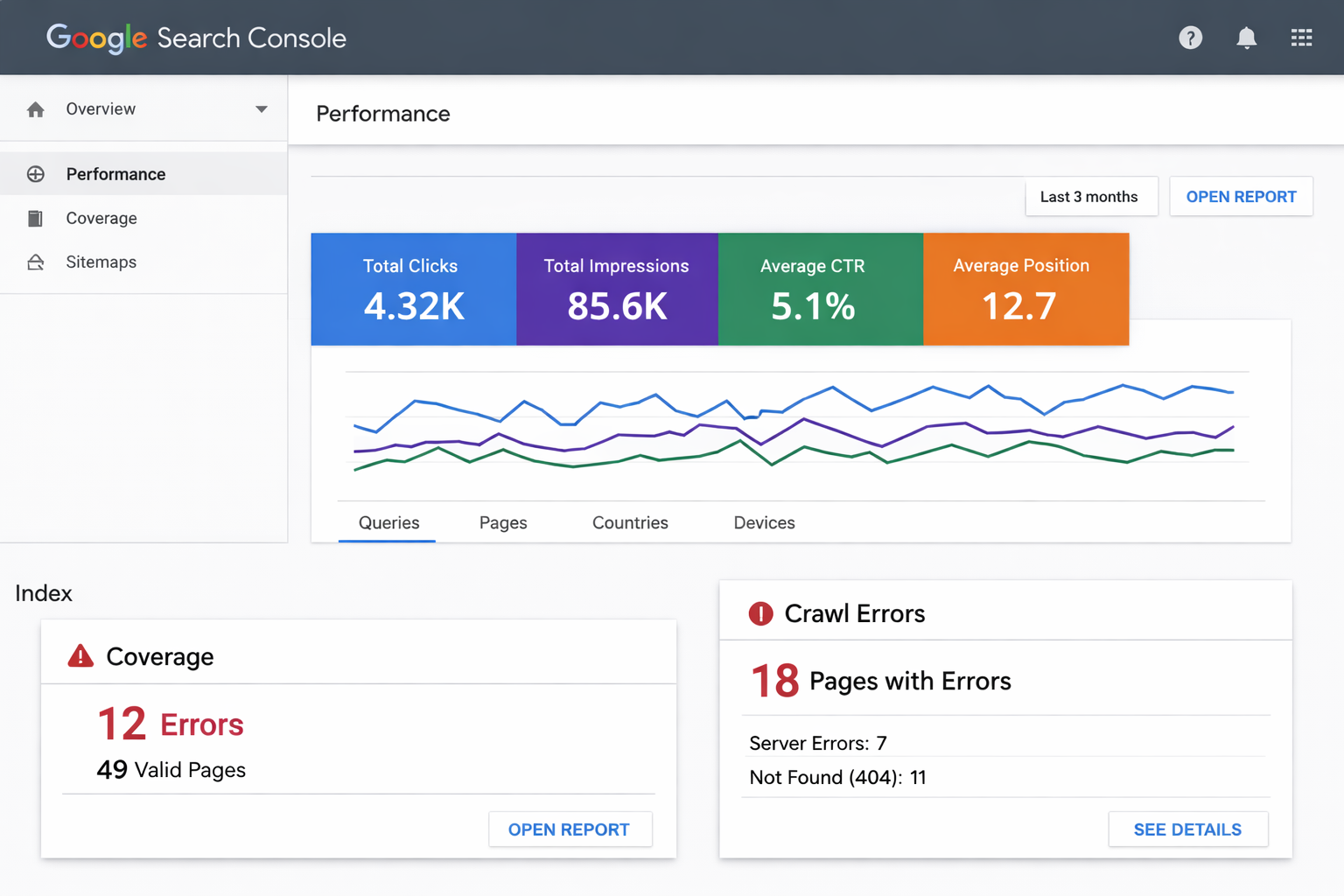
Before diving into technical analysis, you need the right tools and baseline data. Start by ensuring you have administrator access to Google Search Console and Google Analytics for your website. These free tools provide essential data about how Google crawls your site and how users interact with it.
Set up a spreadsheet or project management system to track findings and prioritize fixes. Your audit will uncover dozens or hundreds of issues depending on your site’s size and age. Without organized documentation, you’ll struggle to implement improvements systematically.
Gather your current keyword list if you have one, along with notes about your service areas, primary services, and target customer demographics. This context helps you evaluate whether your current SEO strategy aligns with business goals or needs adjustment.
Block out dedicated time for the audit process. A thorough contractor site audit typically requires 4-8 hours depending on site complexity, though you can spread this across multiple sessions. Rushing through sections leads to missed issues and incomplete analysis.
What Tools Do You Need to Perform an Effective SEO Audit?
You can complete a comprehensive contractor SEO audit using a combination of free and paid tools. The minimum required toolkit includes Google Search Console, Google Analytics, Google PageSpeed Insights, and a mobile-friendly testing tool—all completely free from Google.
Free tools cover the fundamentals effectively. Screaming Frog SEO Spider offers a free version that crawls up to 500 pages, sufficient for most contractor sites. Ubersuggest provides limited free keyword research. Google’s Structured Data Testing Tool validates schema markup. These tools handle technical audits, basic keyword analysis, and site structure review without cost.
Paid tools accelerate the process and provide deeper insights. Semrush, Ahrefs, and Moz offer comprehensive platforms combining technical audits, keyword research, competitor analysis, and backlink evaluation. For contractors serious about SEO, a $99-199 monthly subscription typically pays for itself through improved lead generation.
Specialized local SEO tools like BrightLocal or Whitespark help contractors audit citations, Google Business Profile optimization, and local pack rankings across multiple cities. These become valuable when you serve multiple service areas or compete in highly competitive local markets.
| Tool Type | Free Options | Paid Options | Best For |
| Technical Audit | Screaming Frog (500 pages), Google Search Console | Semrush Site Audit, Ahrefs Site Audit | Finding crawl errors, broken links, duplicate content |
| Keyword Research | Google Keyword Planner, Ubersuggest (limited) | Semrush, Ahrefs, Moz Keyword Explorer | Discovering local search terms, competitor keywords |
| Speed Testing | Google PageSpeed Insights, GTmetrix | WebPageTest Premium | Measuring load times, Core Web Vitals |
| Backlink Analysis | Google Search Console (limited) | Ahrefs, Semrush, Majestic | Evaluating link quality, finding opportunities |
| Local SEO | Google Business Profile, manual citation checks | BrightLocal, Whitespark, LocalFalcon | Citation audits, local pack tracking |
Step 1: Crawl Your Site and Identify Technical Issues
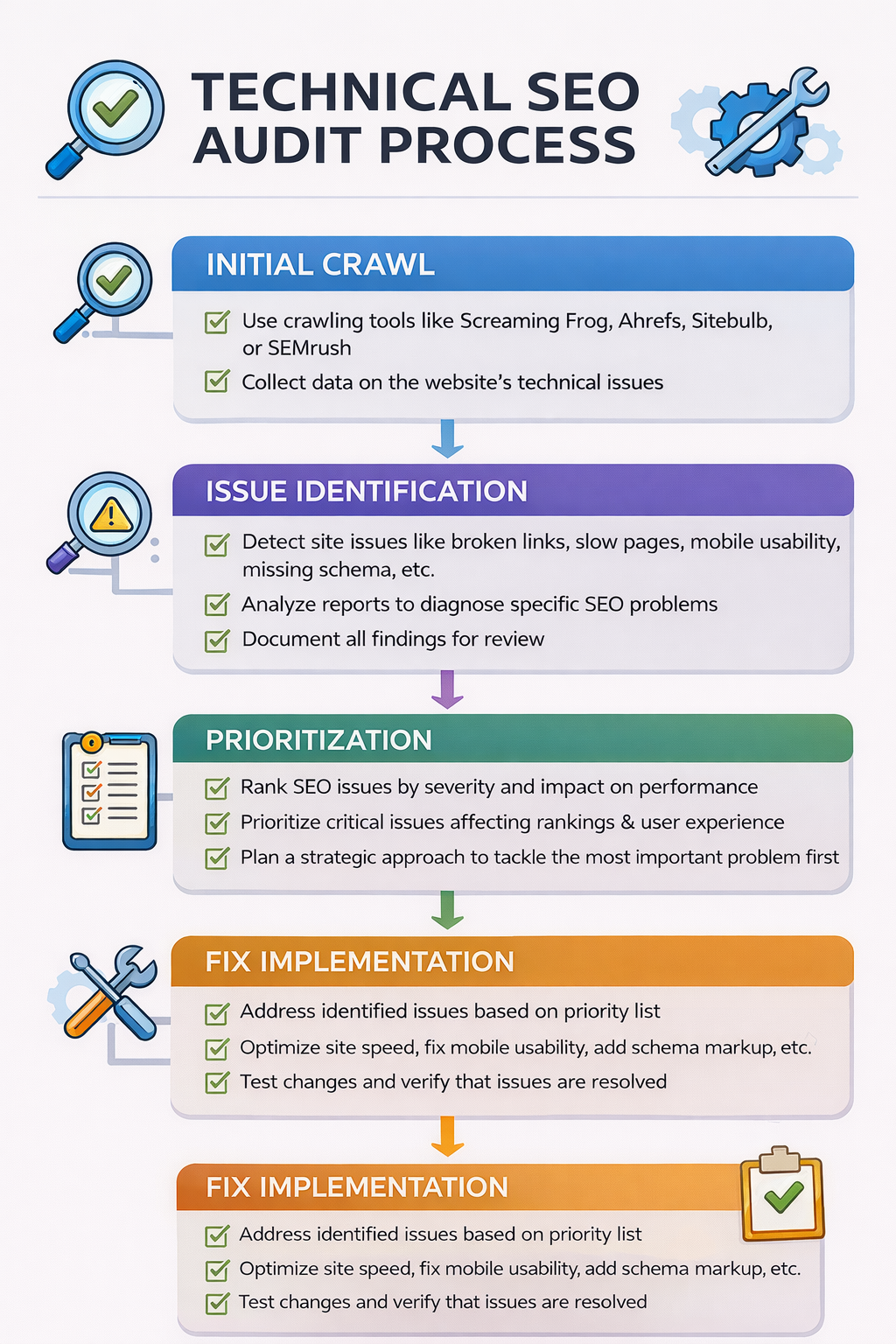
Begin your audit by crawling your entire website to create a complete inventory of pages, assets, and technical elements. Using Screaming Frog or a similar crawler, enter your homepage URL and let the tool spider through every linked page on your site.
Focus first on critical crawl errors that prevent Google from indexing your content. Look for 404 errors (broken pages), 301 redirect chains, server errors (5xx codes), and orphaned pages that have no internal links pointing to them. These issues directly reduce your site’s visibility in search results.
Review your XML sitemap and robots.txt file for misconfigurations. Many contractor sites accidentally block important pages from being crawled or include outdated URLs in their sitemap. Your sitemap should contain only indexable pages, while robots.txt should only block admin sections, duplicate content, or staging environments.
Check for duplicate content issues including multiple pages with identical or very similar content, separate HTTP and HTTPS versions of pages being indexed, or www and non-www versions both appearing in search results. These problems dilute your ranking potential and confuse search engines about which version to display.
Document page load times during the crawl. Pages taking more than 3-4 seconds to load on average create poor user experience and ranking penalties. Note which pages are slowest so you can prioritize speed optimization in later steps.
Common Technical Issues Found on Contractor Websites
Contractor sites frequently suffer from image optimization problems. Service galleries containing dozens of high-resolution before-and-after photos often load slowly because images haven’t been compressed or converted to modern formats like WebP. This single issue can account for 60-80% of page weight.
Mobile usability errors appear regularly on sites built several years ago. Elements like click-to-call buttons that are too small, text that’s illegible without zooming, or horizontal scrolling caused by oversized images all harm mobile rankings. Google’s mobile-first indexing means these issues now affect all rankings, not just mobile results.
Missing or poorly implemented schema markup prevents rich results from appearing in search. Contractor sites benefit significantly from LocalBusiness schema, Review schema, and Service schema that help search engines understand your business type, location, ratings, and service offerings.
Step 2: Analyze Site Speed and Core Web Vitals
Site speed directly impacts both user experience and rankings. Use Google PageSpeed Insights to test your homepage and key service pages, which provides scores for both mobile and desktop along with specific recommendations for improvement.
Core Web Vitals represent Google’s official metrics for measuring user experience quality. These include Largest Contentful Paint (LCP) measuring loading performance, First Input Delay (FID) measuring interactivity, and Cumulative Layout Shift (CLS) measuring visual stability. Your goal is passing thresholds: LCP under 2.5 seconds, FID under 100 milliseconds, and CLS under 0.1.
Identify your largest speed bottlenecks through PageSpeed Insights recommendations. Common culprits include unoptimized images, render-blocking JavaScript and CSS, lack of browser caching, absence of content delivery network (CDN) usage, and bloated page code from WordPress plugins or page builders.
Test multiple pages, not just your homepage. Service pages, location pages, and blog posts often have different performance profiles. A contractor site might have a fast homepage but slow project galleries or blog posts dragging down overall site performance.
Run tests from different locations if you serve multiple geographic areas. A site hosted on the West Coast might load quickly for California contractors but slowly for East Coast users. CDN implementation becomes crucial for contractors serving national markets.
Practical Speed Improvements for Contractor Sites
Image compression delivers the fastest results with minimal technical skill required. Tools like ShortPixel, Imagify, or TinyPNG automatically reduce image file sizes by 50-80% without visible quality loss. This single change often improves page speed scores by 20-30 points.
Lazy loading prevents images below the fold from loading until users scroll down. This technique dramatically improves initial page load times, especially on project gallery pages with dozens of images. Most modern WordPress themes include lazy loading by default, or you can add it through plugins.
Minimizing CSS and JavaScript removes unnecessary code and whitespace. Caching plugins like WP Rocket, W3 Total Cache, or WP Super Cache handle this automatically for WordPress sites while also implementing browser caching and GZIP compression.
Step 3: Evaluate On-Page SEO Elements
On-page optimization determines whether your pages rank for target keywords once technical issues are resolved. Start by auditing title tags across all pages, ensuring each page has a unique, descriptive title containing relevant keywords within 50-60 characters.
Meta descriptions should compel clicks while accurately summarizing page content in 150-160 characters. While meta descriptions don’t directly impact rankings, they significantly affect click-through rates from search results. Higher click-through rates signal relevance to Google, indirectly improving rankings over time.
Review heading tag structure (H1, H2, H3) for proper hierarchy and keyword usage. Each page should have exactly one H1 tag containing the primary keyword, with H2 and H3 tags organizing content into logical sections using related keywords and questions users might search.
Analyze content quality and depth across service pages. Thin content—pages with under 300 words—rarely ranks well for competitive contractor keywords. Compare your service page word counts and comprehensiveness against top-ranking competitors to identify content gaps.
Check internal linking patterns to ensure important pages receive adequate link equity. Your homepage should link to all major service pages, service pages should link to relevant location pages, and blog posts should link to related service pages using descriptive anchor text.
Keyword Optimization for Contractor Service Pages
Each service page should target a primary keyword phrase and 3-5 related secondary keywords. For example, a kitchen remodeling page might target “kitchen remodeling [city]” as primary, with “kitchen renovation cost,” “cabinet installation,” “countertop replacement,” and “kitchen design services” as secondary keywords.
Include primary keywords in the URL slug, title tag, H1, first paragraph, and naturally throughout content. Avoid keyword stuffing—aim for natural language that serves users first. Modern search algorithms penalize forced keyword repetition while rewarding comprehensive topic coverage.
Target question-based keywords through FAQ sections or dedicated content blocks. Users increasingly search using complete questions like “how much does roof replacement cost” or “what’s the best flooring for basements.” Answering these questions directly on service pages improves rankings for these valuable long-tail searches.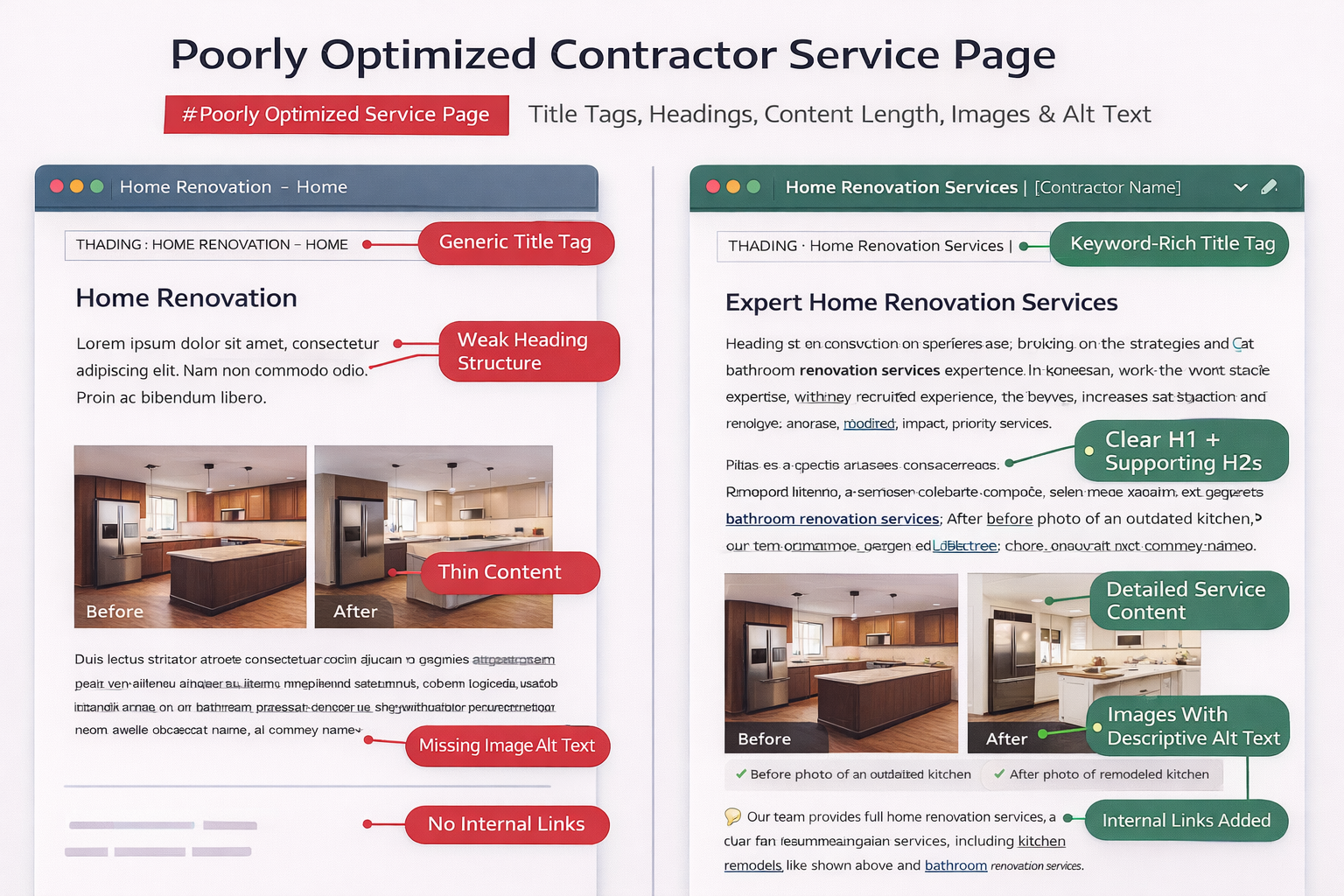
Step 4: Conduct Local SEO and Google Business Profile Analysis
Local SEO determines whether your contractor business appears in the Google Local Pack—the map results showing above organic listings for location-based searches. Start by auditing your Google Business Profile for completeness, accuracy, and optimization.
NAP consistency (Name, Address, Phone number) across all online directories is fundamental to local SEO. Use tools like BrightLocal or Whitespark to scan major citation sources including Yelp, Angi, HomeAdvisor, Yellow Pages, and industry-specific directories. Inconsistent information confuses Google about your actual location and contact details.
Review your Google Business Profile completeness score in the dashboard. Add missing elements like business hours, service areas, attributes, products/services, and high-quality photos. Complete profiles rank higher in local pack results and generate more clicks than sparse listings.
Analyze your review profile including total review count, average rating, review recency, and review response rate. Contractors with 50+ reviews averaging 4.5+ stars consistently outrank competitors with fewer reviews. Implement systematic review generation processes if you’re lagging behind competitors.
Audit location pages if you serve multiple cities or regions. Each location should have a unique page with distinct content, not duplicated templates. Include location-specific information like local team members, projects completed in that area, testimonials from local customers, and unique photos.
Citation Building and Local Link Opportunities
Build citations strategically on authoritative, relevant directories rather than spamming hundreds of low-quality sites. Focus on industry-specific directories like Guild Quality for remodelers, HVAC manufacturers’ dealer locators, or roofing association member directories.
Pursue local backlinks from community organizations, chambers of commerce, local business associations, charity events you sponsor, and local news coverage of projects. These geographically relevant links signal local authority to Google more effectively than generic national links.
Partner with complementary local businesses for reciprocal links and referrals. A roofing contractor might partner with window installers, HVAC companies, or real estate agents, creating natural link opportunities that benefit all parties.
Step 5: Perform Content Audit and Gap Analysis
Export a complete content inventory showing all blog posts, service pages, location pages, and resource content on your site. Record URL, title, word count, publication date, organic traffic, and primary keyword for each piece of content.
Identify underperforming content that generates little organic traffic despite targeting valuable keywords. These pages need updating with fresh information, better keyword optimization, improved formatting, or consolidation with related content. Refreshing old content often delivers better ROI than creating new content.
Look for content gaps by comparing your content inventory against competitor sites ranking for your target keywords. Tools like Semrush’s Content Gap feature show keywords competitors rank for that you’re missing entirely, revealing content opportunities.
Evaluate content quality objectively using metrics like average time on page, bounce rate, and pages per session from Google Analytics. Content with high bounce rates and low time on page indicates quality or relevance issues even if it ranks well temporarily.
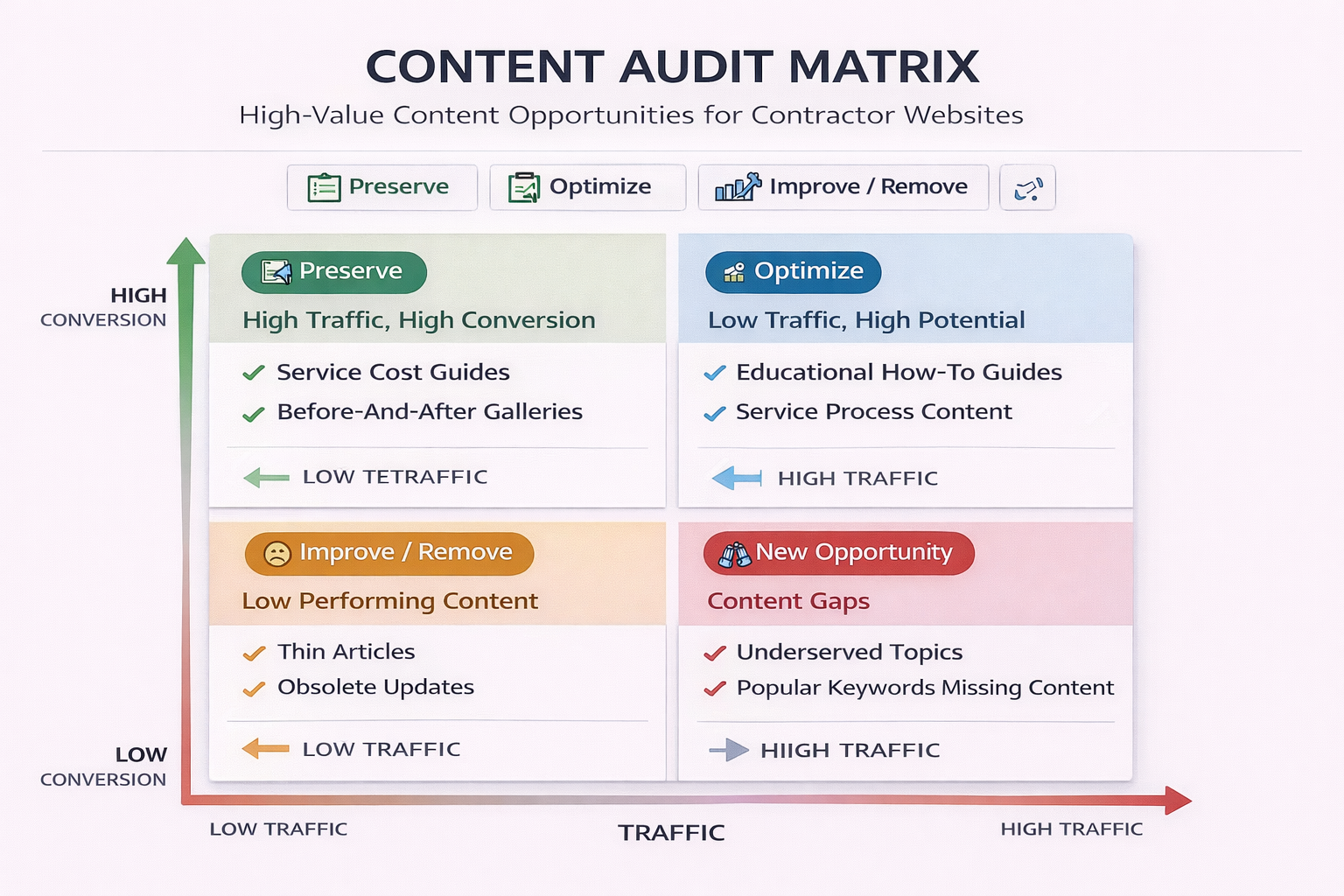
Create a content priority matrix categorizing existing content as: keep and optimize, update and improve, consolidate with other content, redirect to better page, or delete entirely. This systematic approach prevents wasting effort on content that should be removed or consolidated.
High-Value Content Types for Contractor Websites
Service cost guides consistently generate high traffic and qualified leads. Create comprehensive guides like “Kitchen Remodeling Cost Guide [Year]” breaking down costs by project scope, materials, and location factors. Update these annually to maintain accuracy.
Before-and-after project galleries with detailed descriptions attract homeowners researching contractor quality. Include project scope, materials used, timeline, approximate investment, and specific challenges overcome. These pages target “contractor name + reviews” and “[service] examples” searches.
Educational content answering common questions builds authority and trust. Topics like “How to Choose a Roofing Contractor,” “Red Flags When Hiring an HVAC Company,” or “Kitchen Remodeling Timeline and Process” serve users earlier in the research process before they’re ready to request quotes.
Step 6: Analyze Backlink Profile and Competitive Landscape
Use Ahrefs, Semrush, or Moz to analyze your backlink profile including total referring domains, domain authority/rating of linking sites, anchor text distribution, and link growth over time. Quality matters significantly more than quantity in link building.
Identify toxic or spammy backlinks that could trigger manual penalties or algorithmic demotions. Links from gambling sites, adult content, foreign language spam blogs, or obvious link farms should be disavowed through Google Search Console’s disavow tool after attempting removal.
Analyze your competitors’ backlink profiles to discover link opportunities. If three competitors all have links from a local business association or industry publication, you can likely earn similar links. Export competitor backlinks and filter for relevant, achievable opportunities.
Review your anchor text distribution to ensure it looks natural. Over-optimized anchor text—too many exact-match keyword links—appears manipulative to Google. Healthy profiles contain mostly branded anchors, URLs, and generic text like “click here” with only 5-15% exact-match keywords.
Track referring domain growth over time compared to competitors. Stagnant backlink profiles while competitors grow theirs indicates you’re falling behind in this crucial ranking factor. Set monthly link building targets based on competitor pace.
Link Building Strategies for Local Contractors
Create linkable assets like original research, local market reports, or comprehensive guides that naturally attract links. A “Home Renovation Trends in [City] [Year]” report based on your project data becomes shareable content that local news outlets and bloggers reference.
Pursue digital PR through HARO (Help A Reporter Out) by responding to journalist queries related to home improvement, construction, or renovation topics. Even a single quote in a major publication delivers valuable authority and traffic.
Sponsor local events, youth sports teams, or charity initiatives that naturally include website links in sponsor listings. These authentic local links signal geographic relevance while supporting your community.
Step 7: Review Analytics and Set Benchmarks for Improvement
Establish baseline metrics from Google Analytics and Search Console before implementing audit recommendations. Key metrics include organic traffic volume, keyword rankings for priority terms, organic conversion rate, pages per session, and average session duration.
Set specific, measurable goals tied to business outcomes rather than vanity metrics. Instead of “increase traffic 50%,” target “rank top 3 for 10 high-intent service keywords” or “generate 30% more qualified lead form submissions from organic traffic.” These goals connect SEO directly to revenue.
Create a tracking dashboard showing weekly or monthly progress on technical fixes, content improvements, and link building. Many contractors lose momentum after audits because they don’t systematically track implementation and results.
Schedule follow-up audits quarterly to catch new issues early and measure progress against benchmarks. SEO requires continuous optimization, not one-time fixes. Algorithm updates, new competitors, and evolving user search behavior demand ongoing attention.
Document the business impact of your SEO improvements in concrete terms. Calculate cost per lead from organic search, lifetime value of organic customers, and ROI of SEO efforts compared to paid advertising. This data justifies continued investment in optimization.
Tools for Ongoing SEO Monitoring
Rank tracking tools like AccuRanker, SE Ranking, or Semrush Position Tracking automatically monitor your keyword rankings daily or weekly. Set up alerts for significant ranking changes that might indicate technical problems or algorithm impacts.
Google Search Console provides free insights into impressions, clicks, click-through rates, and average position for every query driving traffic to your site. Review the Performance report weekly to spot trending queries and declining pages requiring attention.
Google Analytics 4 offers enhanced measurement of user behavior, conversion paths, and traffic sources. Set up custom reports focusing on organic traffic performance, goal completions from organic visitors, and engagement metrics by landing page.
| Audit Component | Key Metrics to Track | Target Benchmark | Review Frequency |
| Technical Health | Crawl errors, broken links, site speed | Zero critical errors, <3s load time | Monthly |
| Keyword Rankings | Position for target keywords | Top 3 for priority terms | Weekly |
| Organic Traffic | Sessions, users, new vs returning | 20-30% year-over-year growth | Weekly |
| Conversion Performance | Form submissions, phone calls, quote requests | 2-5% conversion rate from organic | Weekly |
| Backlink Profile | Referring domains, domain authority | 5-10 new quality links monthly | Monthly |
| Local Visibility | Local pack rankings, GMB insights | Top 3 local pack for main keywords | Weekly |
Common SEO Audit Mistakes Contractors Should Avoid
Many contractors focus exclusively on technical issues while ignoring content quality and relevance. Technical perfection means nothing if your content doesn’t address user intent or answer the questions homeowners actually search. Balance technical optimization with content improvements for best results.
Trying to fix everything simultaneously overwhelms small teams and leads to incomplete implementation. Prioritize issues based on impact and difficulty, focusing first on high-impact, low-effort fixes like optimizing title tags or fixing broken links before tackling complex technical challenges like site migration or complete redesign.
Neglecting mobile optimization remains surprisingly common despite mobile-first indexing. Test your site on actual mobile devices, not just desktop browser resize tools. Touch targets, form usability, and page speed differ significantly on real smartphones compared to desktop simulations.
Copying competitor strategies without considering your unique positioning wastes resources. Just because a competitor ranks well for certain keywords doesn’t mean those keywords align with your service offerings, pricing tier, or target customer profile. Define your own strategic priorities.
Failing to document changes and track results makes it impossible to determine what’s working. Maintain detailed records of what you changed, when you implemented improvements, and the subsequent impact on rankings and traffic. This data informs future decisions and prevents repeating ineffective tactics.
How to Prioritize and Implement Your Audit Findings
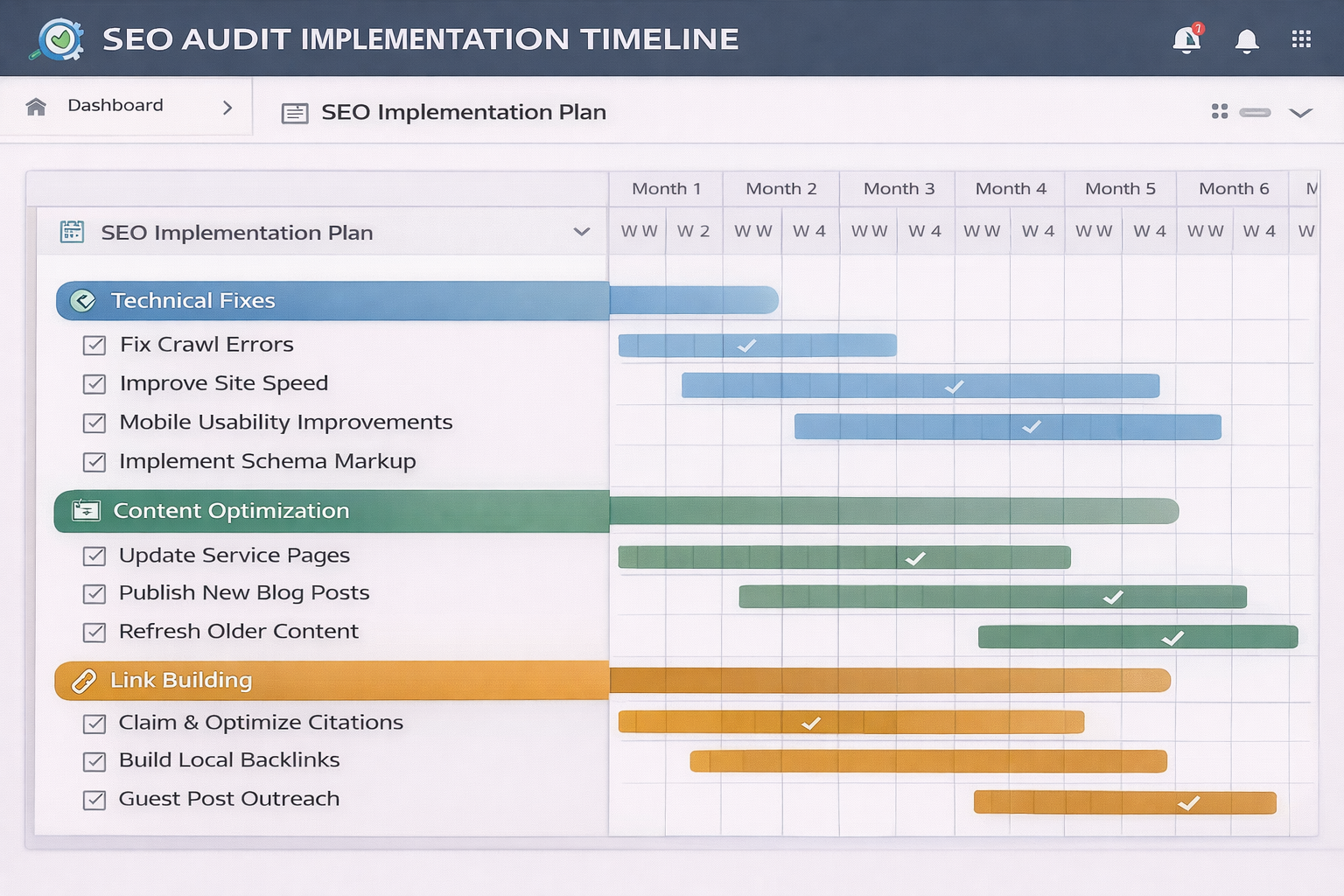
Create an implementation matrix categorizing every identified issue by impact (high, medium, low) and difficulty (easy, moderate, hard). Focus first on high-impact, easy fixes—the quick wins that deliver measurable results within days or weeks.
High-impact issues that directly affect rankings or conversions always take priority regardless of difficulty. Critical technical errors preventing pages from being indexed, major site speed problems, or completely missing local SEO elements justify immediate attention even if implementation requires significant effort.
Delegate technical fixes to developers, content improvements to writers, and link building to marketing staff based on expertise. Trying to handle every aspect yourself slows progress and delivers inferior results compared to leveraging specialists.
Set realistic timelines acknowledging that comprehensive SEO improvements take months, not weeks. A typical contractor site audit might identify 50-100 issues requiring 3-6 months of sustained effort to address fully, even with dedicated resources.
Implement changes in phases, measuring impact after each phase before proceeding. This approach helps you identify which improvements drive the most significant results and allows course correction if certain tactics prove ineffective for your specific situation.
Frequently Asked Questions
How to do an SEO audit 7 steps for beginners free tools?
Start with Google Search Console to identify crawl errors and indexing issues. Run your site through Google PageSpeed Insights for speed analysis and Core Web Vitals. Use Screaming Frog’s free version (up to 500 pages) to crawl your site and find technical problems. Check your Google Business Profile for local SEO completeness. Review on-page elements like title tags and meta descriptions manually. Analyze your top-performing content in Google Analytics to identify patterns. Finally, manually research competitor rankings and backlinks to find gaps in your strategy.
How do you perform a technical SEO audit?
A technical SEO audit examines the infrastructure and backend elements affecting search engine crawling and indexing. Crawl your entire site using tools like Screaming Frog or Sitebulb to identify broken links, redirect chains, duplicate content, and orphaned pages. Test site speed using Google PageSpeed Insights and Core Web Vitals performance. Verify your XML sitemap and robots.txt file configurations. Check mobile usability through Google’s Mobile-Friendly Test. Review your site architecture and internal linking structure. Validate structured data implementation using Google’s Rich Results Test. Examine HTTPS implementation and security certificates. This comprehensive technical review typically uncovers 20-50 issues on an average contractor website that directly impact rankings.
Which tool is best for SEO audit?
Semrush offers the most comprehensive all-in-one SEO audit platform, combining technical site audits, keyword research, competitor analysis, and backlink evaluation in a single dashboard. Ahrefs provides superior backlink analysis and competitive research capabilities. For contractors on limited budgets, Google Search Console combined with Screaming Frog’s free version and Google PageSpeed Insights covers the essential audit components at no cost. The “best” tool depends on your budget and specific needs—beginners should start with free tools before investing in paid platforms once they understand what insights they need most.
What are the 7 elements of an audit report?
A complete SEO audit report should include: an executive summary highlighting critical issues and priority recommendations; technical health assessment covering crawlability, site speed, and mobile usability; on-page optimization analysis of title tags, meta descriptions, content quality, and keyword usage; local SEO evaluation including Google Business Profile and citation consistency; backlink profile analysis showing link quality and competitive comparison; content audit identifying gaps and opportunities; and actionable recommendations prioritized by impact and difficulty. Each section should include specific data, screenshots, and clear next steps rather than general observations.
What are the 5 C’s of audit?
While the 5 C’s traditionally apply to financial auditing, they can be adapted for SEO audits: Crawlability ensures search engines can access and index your content; Content quality evaluates whether pages satisfy user intent and target appropriate keywords; Citations refer to local directory listings and NAP consistency for local contractors; Connections represent your backlink profile and link building strategy; and Conversion optimization examines whether organic traffic transforms into leads and customers. This framework helps contractors remember the major audit components and ensures comprehensive analysis rather than focusing narrowly on just technical or content issues.
Conclusion: Turn Your Audit Into Consistent Lead Generation
Your SEO audit is only valuable if it leads to systematic implementation and measurable business results. The contractors who succeed with SEO treat audits as the beginning of an ongoing optimization process, not a one-time project to check off a list.
Start with your highest-priority technical fixes this week, implement content improvements next month, and build your link profile consistently over time. Track your organic traffic, lead generation, and revenue from search to prove ROI and justify continued investment in your digital presence.
Ready to transform your contractor website into a consistent lead generation machine? GC Sherpa helps contractors implement comprehensive SEO strategies that drive qualified traffic and convert visitors into customers. Our team handles technical optimization, content creation, and local SEO so you can focus on serving customers and growing your business. Schedule a free consultation to discover how we can improve your site’s performance and visibility in your service areas.