

Construction websites commonly struggle with slow page speed, poor mobile optimization, missing local SEO elements, duplicate content, and technical crawl errors. Fixing these issues requires optimizing images, implementing responsive design, claiming Google Business profiles, creating unique service pages, and resolving broken links—all of which directly impact search visibility and lead generation for contractors.
Construction companies lose qualified leads every day because their websites can’t be found in search results. While your competitors rank on page one for “general contractor near me,” technical SEO problems keep your site buried on page three—or worse.
The good news? Most SEO issues on construction websites follow predictable patterns. Once you identify and fix these common problems, your site can start competing for the local searches that drive real business.
This guide walks you through the exact issues holding back contractor websites and provides step-by-step solutions you can implement immediately.
Key Takeaways
- Page speed issues cause 53% of mobile visitors to abandon slow-loading construction sites. Compress images and enable caching to improve load times under 3 seconds.
- Mobile optimization failures hurt rankings since Google uses mobile-first indexing. Responsive design and touch-friendly navigation are non-negotiable for contractor websites.
- Missing local SEO elements like Google Business Profile optimization and location-specific pages prevent contractors from appearing in “near me” searches that drive 76% of local service inquiries.
- Duplicate content across service pages dilutes ranking power. Create unique, detailed content for each construction service you offer.
- Technical crawl errors including broken links, missing redirects, and poor site architecture block search engines from indexing your most important pages.
- Weak on-page SEO with generic titles, missing meta descriptions, and poor heading structure signals low-quality content to search engines.
Why Construction Websites Face Unique SEO Challenges
Construction companies operate in intensely competitive local markets where search visibility directly correlates with project inquiries. Unlike national e-commerce brands, contractors need to dominate search results in specific geographic areas while competing against dozens of similar businesses.
Most construction websites inherit problems from outdated templates, DIY website builders, or developers who prioritize aesthetics over search performance. The result? Beautiful portfolio sites that generate zero organic traffic.
The construction industry faces specific SEO obstacles: project-based business models create seasonal traffic fluctuations, services span multiple specialties requiring separate optimization strategies, and local competition intensifies around high-value commercial keywords.
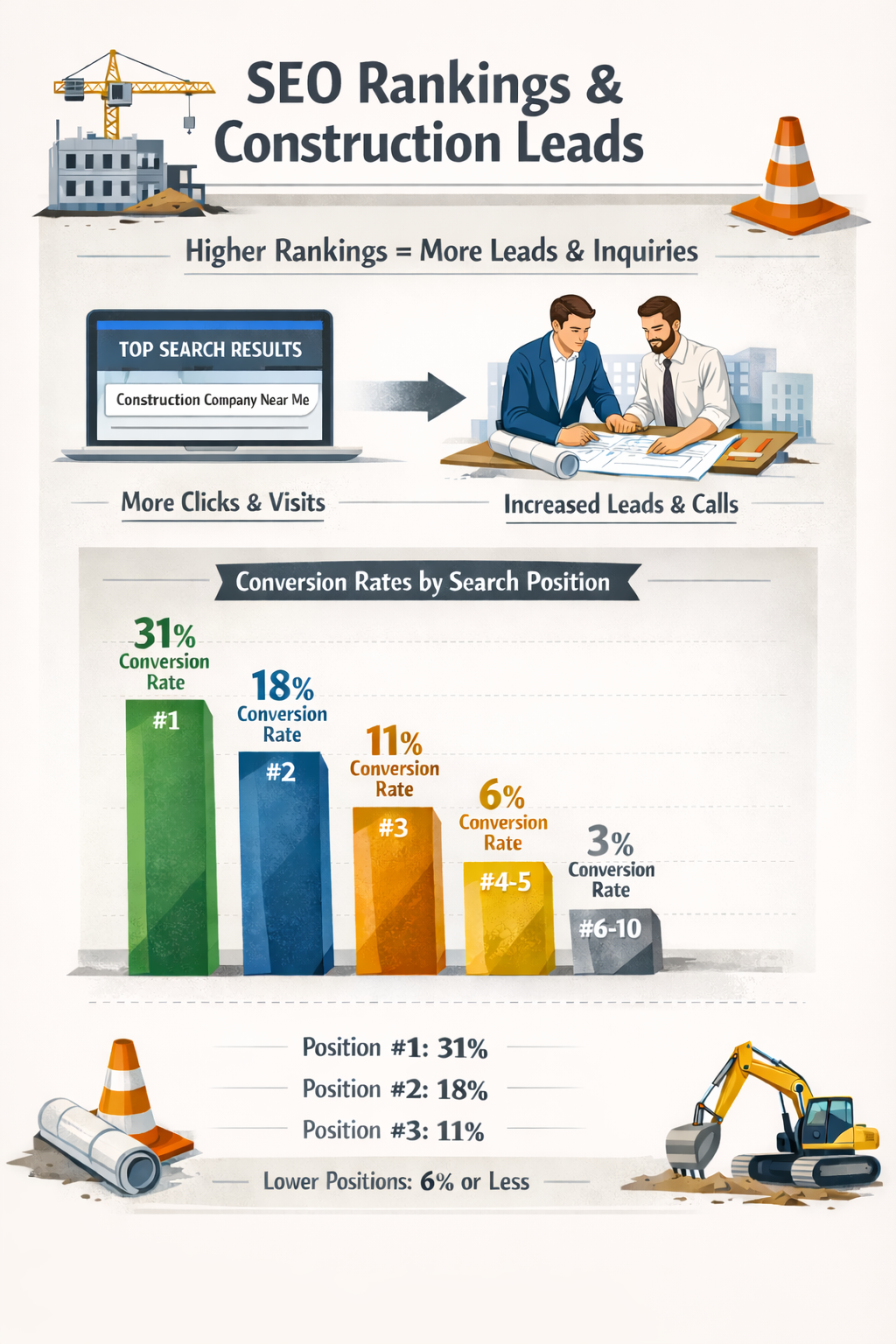
Issue #1: Slow Page Speed Destroying Mobile Experience
Page speed represents the most critical technical factor affecting both search rankings and user experience. Google’s Core Web Vitals update made load time a direct ranking signal, punishing sites that take longer than 2.5 seconds to display content.
Construction websites particularly struggle with speed because they rely heavily on high-resolution project photos, embedded videos, and image galleries. A single unoptimized photo can add 3-5 seconds to load time.
How to Diagnose Speed Problems
Run your website through Google PageSpeed Insights or GTmetrix to identify specific bottlenecks. Look for these common culprits: images larger than 200KB, uncompressed CSS and JavaScript files, missing browser caching, and slow server response times.
Pay special attention to mobile performance scores. If your desktop site loads quickly but mobile performance falls below 50, you’re losing potential customers who search from job sites or during commutes.
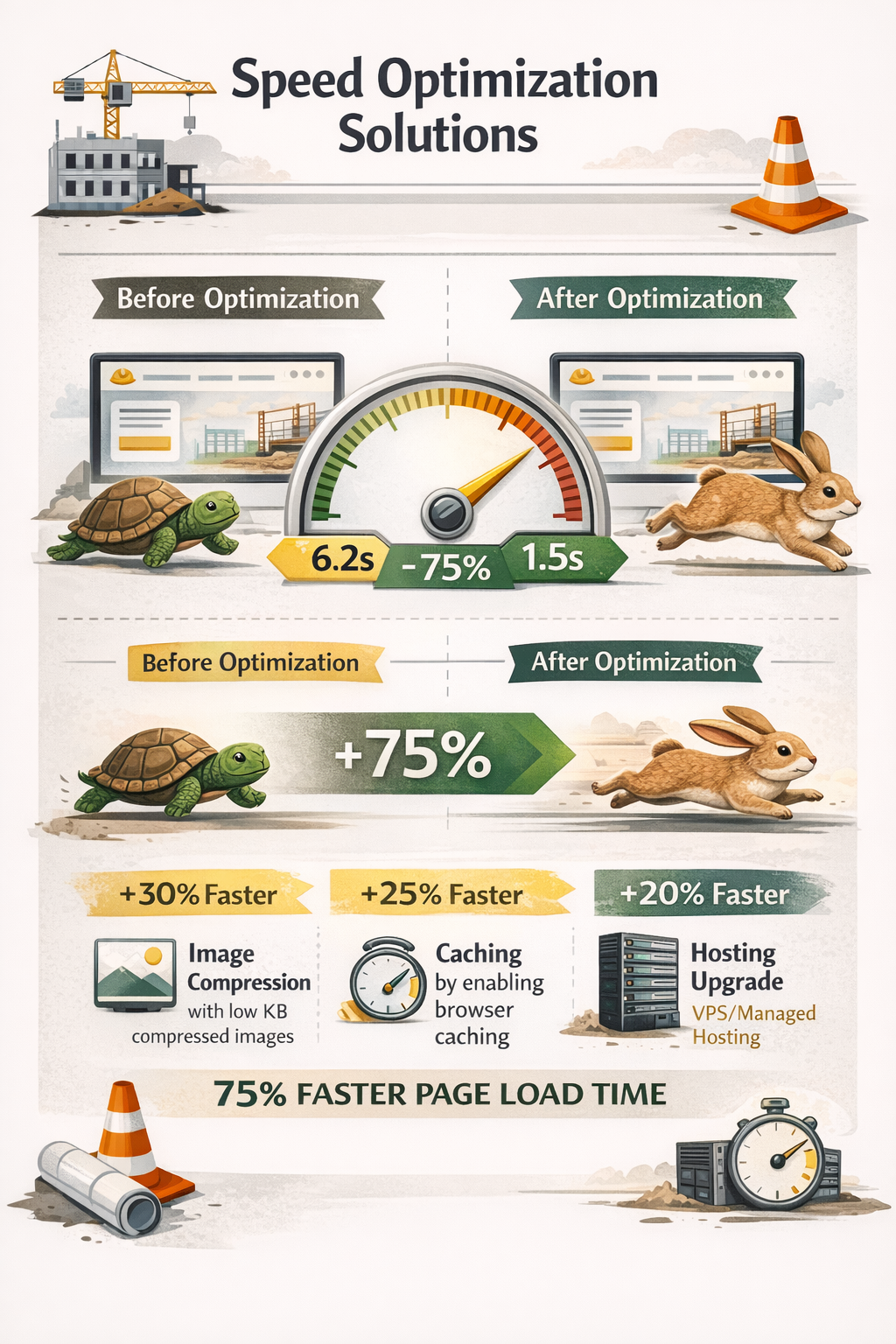
Speed Optimization Solutions
Start with image optimization, which typically delivers the biggest performance gains. Compress all images to under 150KB using tools like TinyPNG or ShortPixel, convert photos to WebP format, and implement lazy loading so images only load when users scroll to them.
Enable browser caching through your hosting control panel or caching plugins like WP Rocket. This stores static resources on visitors’ devices, dramatically reducing load times for returning users.
Consider upgrading to faster hosting if you’re on shared servers. Construction websites with extensive portfolios perform better on managed WordPress hosting or VPS platforms that offer dedicated resources.
Issue #2: Mobile Optimization Failures Costing Rankings
Google’s mobile-first indexing means the search engine primarily uses the mobile version of your site for ranking and indexing. If your construction website doesn’t work properly on smartphones, you’re invisible to 60% of local searchers.
Many contractor sites built on older templates break on mobile devices. Text overlaps images, navigation menus become unusable, contact forms extend beyond screen boundaries, and click-to-call buttons don’t function.
Mobile-First Design Requirements
Responsive design automatically adjusts your website layout to fit any screen size. This isn’t optional—it’s foundational for modern SEO. Your site should use CSS media queries to reflow content, stack elements vertically on small screens, and scale images proportionally.
Test mobile usability with Google’s Mobile-Friendly Test tool. This identifies specific issues like text that’s too small to read, clickable elements placed too close together, and viewport configuration errors.
Essential Mobile Features for Contractors
Implement these mobile-specific elements that matter for construction businesses: prominent click-to-call buttons at the top of every page, simplified navigation menus with touch-friendly spacing, contact forms optimized for mobile input, and project galleries that work smoothly with swipe gestures.
Incorporating thoughtful web design for general contractors ensures your mobile experience converts visitors into leads rather than sending them to competitors with better-optimized sites.
Ensure your phone number appears in the header with tel: linking for instant dialing. Many contractors lose emergency service calls because mobile visitors can’t quickly find contact information.
Issue #3: Missing or Incomplete Local SEO Setup
Local SEO determines whether your construction company appears in the map pack and local search results when nearby customers need your services. This represents the highest-converting traffic source for contractors, yet most fail to optimize properly.
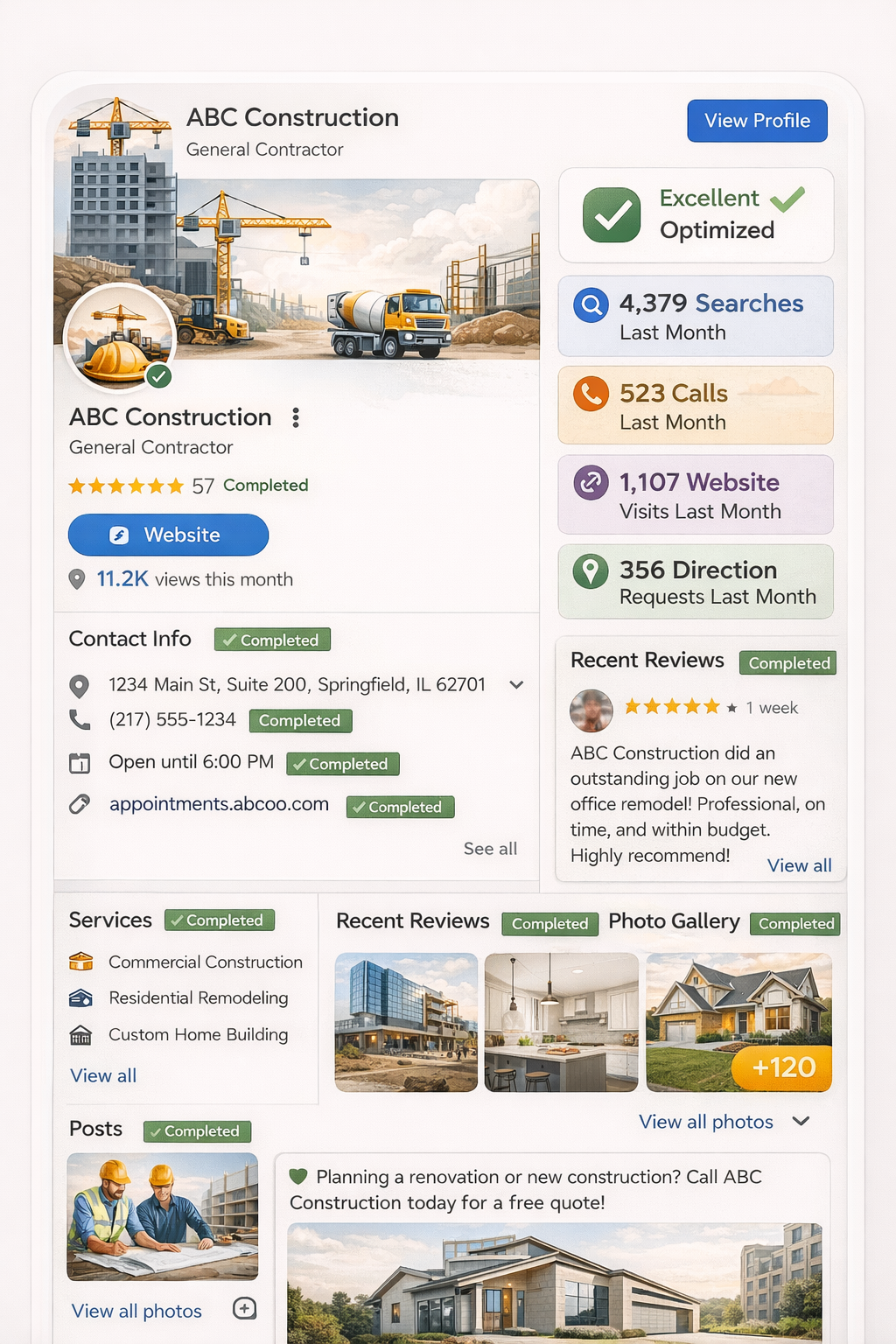
The foundation of local visibility starts with your Google Business Profile (formerly Google My Business). An incomplete or inconsistent profile signals poor business legitimacy to both search engines and potential customers.
Google Business Profile Optimization
Claim and verify your Google Business Profile if you haven’t already. Complete every section: accurate business name, address, and phone number (NAP), primary and secondary categories, service areas, business hours including holidays, and detailed business description with relevant keywords.
Upload high-quality photos regularly—at least 10 project photos, team photos, and office/equipment images. Profiles with photos receive 42% more direction requests and 35% more website clicks than those without.
Actively collect and respond to Google reviews. Aim for at least 25 reviews with an average rating above 4.0. Respond to every review within 48 hours to show engagement and customer service commitment.
Location-Specific Website Content
Create dedicated service area pages for each city or region you serve. Generic “Service Areas” pages don’t rank well. Instead, build comprehensive landing page for contractor websites content that includes local landmarks, neighborhood names, and area-specific construction considerations.
Add schema markup to your website’s code to explicitly tell search engines your business name, address, service areas, and local phone number. This structured data helps you appear in rich search results and knowledge panels.
Understanding Local SEO for General Contractors means consistently maintaining NAP information across all online directories, from Yelp and HomeAdvisor to industry-specific platforms like BuildZoom and Houzz.
Issue #4: Duplicate Content Across Service Pages
Many construction websites copy-paste the same template text across multiple service pages, changing only the service name. This creates duplicate content that confuses search engines about which page should rank for specific searches.
When Google encounters identical content on yoursite.com/kitchen-remodeling and yoursite.com/bathroom-remodeling, it typically chooses one to rank and ignores the others. You’re essentially competing against yourself while diluting ranking potential.
Creating Unique Service Content
Write completely original content for each construction service you offer. Focus on what makes that service unique: specific materials used, typical project timelines, common client concerns, pricing factors, and relevant building codes or permits.
For example, a commercial roofing page should discuss flat roof systems, EPDM vs TPO membranes, warranty considerations, and business downtime concerns—completely different from residential roofing content about shingle types and attic ventilation.
Aim for at least 800-1,200 words per service page with detailed subsections covering the process, materials, timeline, and frequently asked questions specific to that service.
Avoiding Thin Content Problems
Thin content—pages with minimal text and little value—performs poorly in search results. Service pages with just a paragraph and a contact form won’t rank competitively.
Expand service pages with: detailed process explanations, before-and-after project galleries, client testimonials specific to that service, answers to service-specific questions, and related blog post links that provide additional value.
Quality on-page SEO for contractors requires substantial, helpful content that demonstrates expertise and gives potential clients the information they need to make hiring decisions.
Issue #5: Technical Crawl Errors Blocking Search Engines
Technical SEO errors prevent search engine bots from properly crawling, indexing, and ranking your website. Even with excellent content, technical problems can make your site invisible in search results.
Construction websites commonly inherit technical debt from platform migrations, design updates, or accumulated changes over time. These errors often go unnoticed until traffic drops significantly.
Common Crawl Errors to Fix
Broken links (404 errors) damage user experience and waste crawl budget. Use tools like Screaming Frog or Google Search Console to identify broken internal and external links, then either fix them or remove them entirely.
Redirect chains occur when a URL redirects to another URL that redirects again, creating inefficient paths. Replace chains with direct 301 redirects from the old URL to the final destination.
Missing XML sitemap makes it harder for search engines to discover all your pages. Generate and submit an XML sitemap through Google Search Console that includes all important pages while excluding thank-you pages, admin areas, and duplicate content.
Site Architecture and Navigation
Poor site structure creates orphaned pages that search engines can’t find and visitors can’t navigate to. Organize your construction website with clear hierarchy: homepage → service category pages → individual service pages → blog posts.
Implement breadcrumb navigation to show users and search engines the site structure. Ensure every page is accessible within 3 clicks from the homepage.
Create a logical internal linking strategy that connects related services, blog posts, and portfolio projects. This distributes ranking power throughout your site and helps search engines understand content relationships.
| Technical Error | Impact on SEO | Quick Fix |
| Broken Links (404s) | Wastes crawl budget, poor UX | Find and redirect or remove dead links |
| Missing Sitemap | Incomplete indexing | Generate XML sitemap, submit to GSC |
| Redirect Chains | Slow crawling, diluted link equity | Create direct 301 redirects |
| Orphaned Pages | Pages not discovered or indexed | Add internal links from main pages |
| Blocked Resources | Prevents proper rendering | Check robots.txt, allow critical files |
Issue #6: Weak On-Page SEO Elements
On-page SEO refers to the optimization of individual page elements that signal relevance and quality to search engines. Many construction websites neglect these basics, leaving easy ranking opportunities on the table.
Title tags, meta descriptions, heading structures, and content optimization work together to tell search engines exactly what each page offers and why it deserves to rank.
Optimizing Title Tags and Meta Descriptions
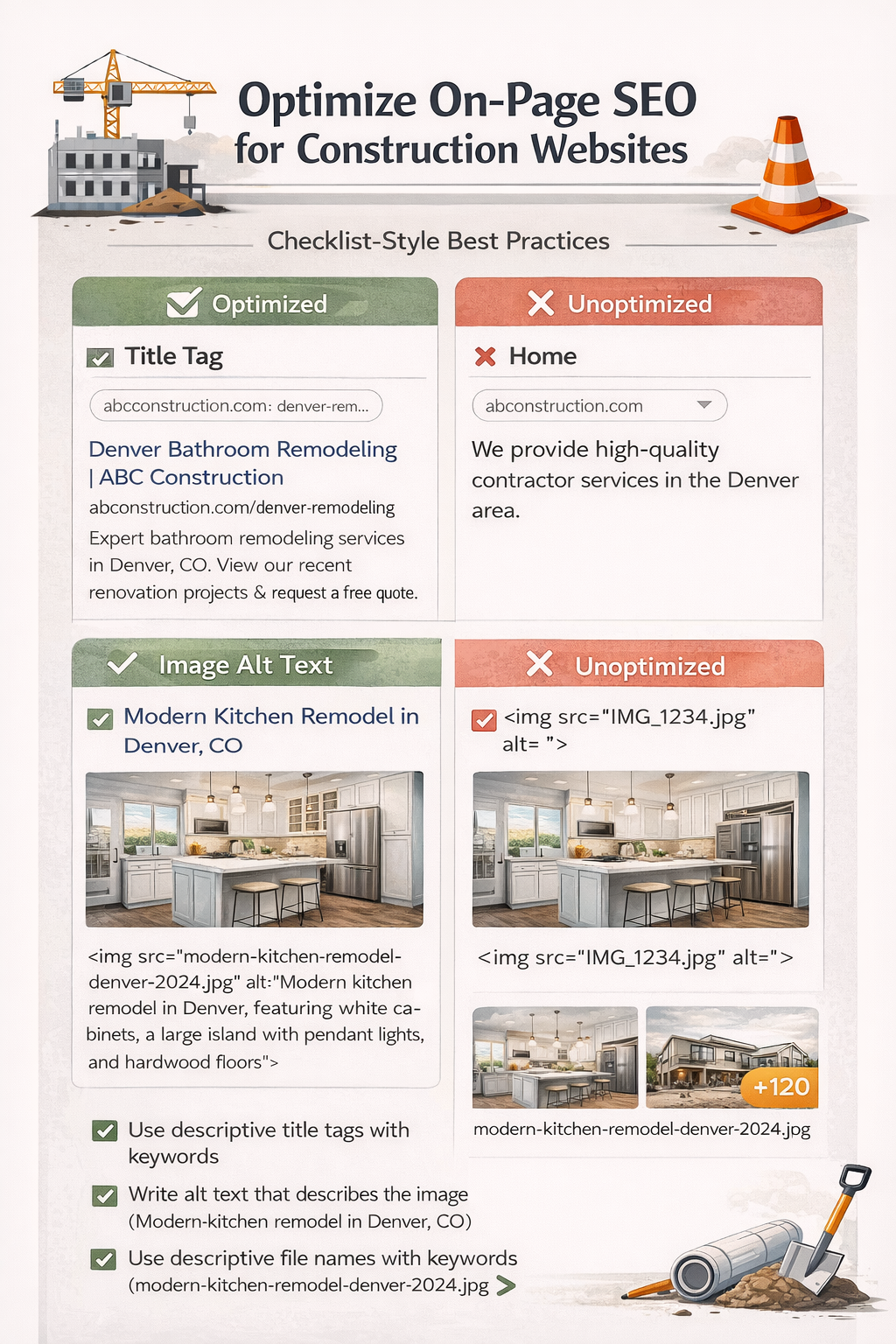
Title tags appear as the blue clickable headline in search results. Create unique titles for every page that include your target keyword near the beginning, your location for local pages, and your company name. Keep titles under 60 characters to avoid truncation.
Poor title example: “Services | ABC Construction”
Optimized title: “Kitchen Remodeling Denver | ABC Construction Co”
Meta descriptions don’t directly impact rankings but significantly affect click-through rates. Write compelling 150-160 character descriptions that include keywords, explain the page’s value, and include a call-to-action.
Heading Hierarchy and Content Structure
Use one H1 tag per page that clearly states the page’s topic. Structure content with H2 subheadings for main sections and H3 tags for subsections. This hierarchy helps search engines understand content organization and improves readability.
Include target keywords naturally in headings, but prioritize clarity over keyword stuffing. “What to Expect During Kitchen Remodeling” works better than “Kitchen Remodeling Kitchen Renovation Kitchen Upgrades.”
Image Alt Text and File Names
Every image needs descriptive alt text that explains what the image shows. This helps search engines understand image content and improves accessibility for visually impaired users.
Use descriptive file names before uploading images. Change “IMG_1234.jpg” to “modern-kitchen-remodel-denver-2024.jpg” to add keyword context and improve image search visibility.
Issue #7: Poor Content Strategy and Relevance
Beyond technical optimization, construction websites often fail to publish the type of content that actually answers searcher questions and demonstrates expertise. Generic portfolio sites with no educational content struggle to compete.
Search engines reward websites that comprehensively cover topics and provide genuine value to users. This means going beyond service pages to create resources that address every stage of the customer journey.
Building Topic Authority
Topic clusters involve creating comprehensive content around core service offerings. For a commercial roofing contractor, this might include: main service page about commercial roofing, blog posts about roof types, maintenance guides, cost breakdowns, inspection checklists, and seasonal preparation tips.
Link all related content together to show search engines your depth of expertise. When you publish 10-15 interconnected pieces about commercial roofing, you establish stronger authority than competitors with just a single service page.
Answering Customer Questions
Research the actual questions your potential customers ask using tools like Answer the Public, Google’s “People Also Ask” boxes, and questions you receive in sales calls or consultations.
Create dedicated blog posts or FAQ pages that directly answer these questions with detailed, honest information. Content that addresses “how much does a kitchen remodel cost” or “how long does roof replacement take” captures high-intent searchers who are close to hiring.
Tools for Monitoring and Fixing SEO Issues
Identifying SEO problems requires the right diagnostic tools. While many premium options exist, several free tools provide construction companies with actionable insights.
Google Search Console is essential—it’s free and shows exactly how Google sees your site. Monitor indexing status, search performance, mobile usability issues, and Core Web Vitals directly from Google.
Google Analytics 4 tracks traffic sources, user behavior, and conversion paths. Set up goals for form submissions and phone calls to understand which SEO improvements drive actual business results.
Screaming Frog SEO Spider (free for up to 500 URLs) crawls your entire site to identify broken links, duplicate content, missing meta data, and technical errors in minutes.
PageSpeed Insights and GTmetrix diagnose performance issues and provide specific recommendations for improving load times and Core Web Vitals scores.
Run monthly audits using these tools to catch new issues before they impact rankings. SEO maintenance is ongoing, not a one-time project.
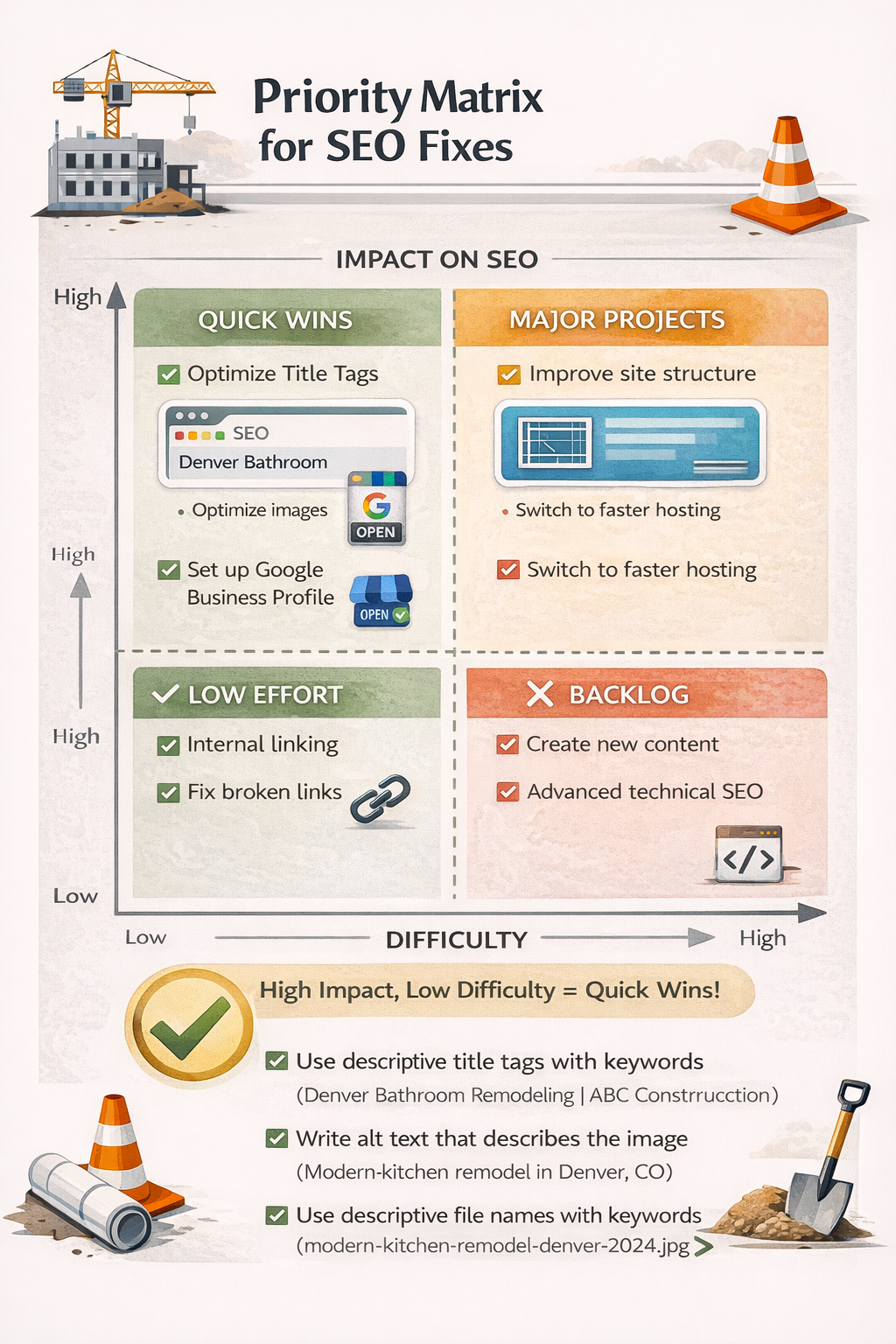
Prioritizing SEO Fixes for Maximum Impact
Not all SEO issues deserve equal attention. When you’re overwhelmed with problems, prioritize fixes based on potential impact and implementation difficulty.
High-impact, easy fixes: Optimize title tags and meta descriptions, fix broken links, compress large images, claim and optimize Google Business Profile, add missing alt text to images.
High-impact, moderate difficulty: Improve page speed, implement mobile-responsive design, create unique content for duplicate pages, build location-specific landing pages, generate and submit XML sitemap.
High-impact, complex fixes: Restructure site architecture, migrate to better hosting, implement comprehensive schema markup, develop topic cluster content strategy, fix complex redirect chains.
Start with quick wins that demonstrate measurable improvement, then tackle more complex technical issues. Document changes and monitor results in Google Analytics and Search Console to validate your efforts.
Frequently Asked Questions
What is the 80/20 rule in SEO?
The 80/20 rule in SEO suggests that 80% of your search traffic and results come from 20% of your optimization efforts. For construction websites, this typically means focusing on high-priority fixes like mobile optimization, Google Business Profile completion, and creating quality service pages rather than spreading effort across countless minor tweaks. Identify the critical few improvements that drive the majority of your visibility and lead generation.
How to improve SEO for contractors?
Contractors improve SEO by optimizing local search elements first—claim and complete your Google Business Profile, create location-specific service pages, and build consistent NAP citations across directories. Then focus on technical fundamentals: fast page speed, mobile-responsive design, and clean site architecture. Finally, develop content that answers customer questions and demonstrates expertise in your specific construction specialties. Regular monitoring and adjustments based on Search Console data ensure continued improvement.
What are the 3 C’s of SEO?
The 3 C’s of SEO are Content, Code, and Credibility. Content means creating valuable, relevant information that matches search intent. Code refers to technical optimization—site structure, page speed, mobile-friendliness, and proper HTML markup. Credibility involves building authority through backlinks, reviews, citations, and demonstrating expertise. For construction companies, all three elements must work together: quality service descriptions, properly optimized technical infrastructure, and strong local reputation signals.
How do website builders handle SEO?
Website builders vary significantly in SEO capability. Modern platforms like WordPress with SEO plugins offer excellent control over technical elements, while some DIY builders impose limitations on customization, site speed, and mobile optimization. Many construction websites built on basic website builders struggle with slow load times, restricted code access, and limited schema markup options. When evaluating platforms, test their ability to customize title tags, create clean URLs, optimize images, and generate XML sitemaps before committing.
What is the golden rule of SEO?
The golden rule of SEO is to create content for users first, search engines second. This means focusing on providing genuine value, answering real questions, and solving actual problems your potential customers face—not just inserting keywords to manipulate rankings. When construction companies prioritize helpful, detailed information about their services, processes, and expertise, search engines naturally reward that quality with better visibility. Technical optimization supports great content but can’t compensate for thin, unhelpful pages.
Start Fixing Your Construction Website’s SEO Today
SEO issues don’t fix themselves. Every day your construction website suffers from slow load times, poor mobile experience, or missing local optimization is another day competitors capture leads that should be yours.
The good news? You now know the exact problems holding back most contractor websites and have actionable solutions for each one. Start with high-impact fixes like compressing images, claiming your Google Business Profile, and optimizing title tags. Then systematically work through technical errors and content improvements.
GC Sherpa specializes in helping construction companies dominate local search results. Whether you need a complete SEO audit, technical fixes, or ongoing optimization to stay ahead of competitors, we understand the unique challenges contractors face in digital marketing. Stop losing qualified leads to better-optimized websites—let’s build your search visibility on the solid foundation your business deserves.