
Your Google Business Profile is the single most powerful free tool for attracting local customers searching for your services. Optimizing it correctly increases your visibility in local search results, drives more qualified leads, and builds trust with potential customers before they ever contact you. This guide shows you exactly how to do it.
When someone in your area searches for what you offer, your Google Business Profile is often the first impression they get of your company. It appears prominently in Google Maps, local search results, and the knowledge panel on the right side of desktop searches. If your profile is incomplete, outdated, or poorly optimized, you’re losing potential customers to competitors who’ve taken the time to do it right.
The good news? Most businesses still haven’t optimized their profiles properly. That means a relatively small investment of time can give you a significant competitive advantage in your local market.
Key Takeaways:
- Complete profiles with accurate information receive 7x more clicks than incomplete ones
- Adding photos increases customer engagement and can boost your search visibility by up to 35%
- Regular posts and updates signal to Google that your business is active and relevant
- Reviews are the most influential factor in local search rankings and customer decision-making
- Your profile should be optimized for both human readers and search algorithms
- Strategic use of business categories and attributes helps Google understand what you offer
Why Your Google Business Profile Matters More Than Ever
Google processes over 8 billion searches every single day, and a significant portion of those are local searches from people looking for businesses nearby. When someone searches “plumber near me” or “best contractor in [city],” Google doesn’t show a traditional list of website links first. Instead, it displays the Local Pack, a map with three business listings that dominate the top of the results page.
Studies show that 76% of people who search for something nearby on their smartphone visit a business within 24 hours, and 28% of those searches result in a purchase. If your Google Business Profile isn’t optimized, you’re invisible to these high-intent customers who are ready to buy right now.
Think about what this means for your business. These aren’t casual browsers killing time online. They’re people with an immediate need, often willing to pay for quality service, searching specifically in your geographic area. Your optimized profile puts you directly in front of them at the exact moment they’re making a decision.
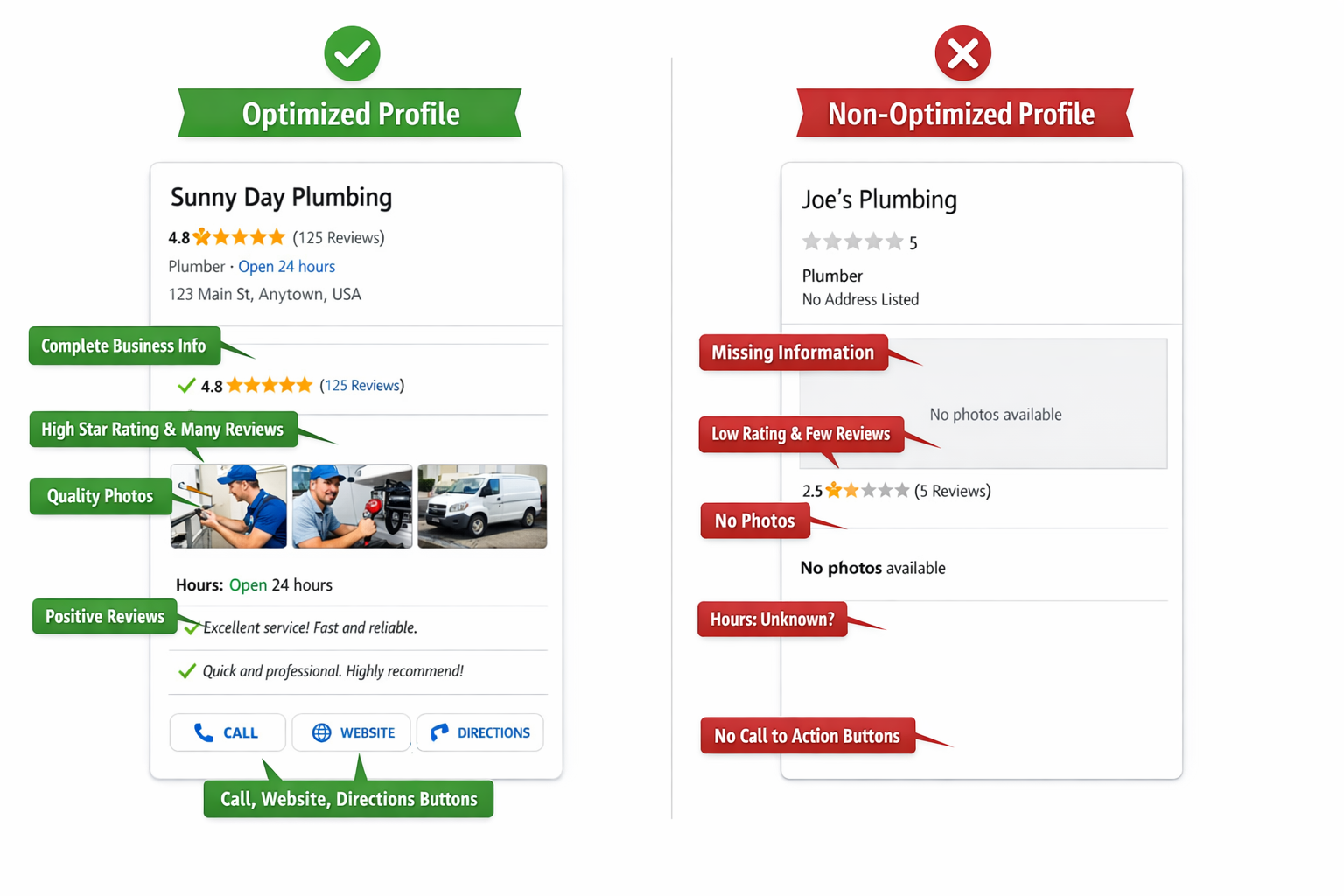
Your profile also serves as a trust signal. Before picking up the phone or visiting your website, potential customers evaluate your star rating, read recent reviews, check your photos, and look at your business hours. A well-maintained profile tells them you’re professional, legitimate, and worth contacting.
How to Claim and Verify Your Google Business Profile
Before you can optimize anything, you need to claim ownership of your profile. Many businesses already have a profile that Google created automatically from public information, but you can’t manage it until you verify you’re the owner.
Start by searching for your business name on Google Maps. If a profile exists, click on it and look for a link that says “Claim this business” or “Own this business?” Follow the prompts to start the verification process. If no profile exists, you’ll need to create one from scratch by going to business.google.com and clicking “Add your business to Google.”
Google offers several verification methods, with postcard verification being the most common. They’ll mail a postcard with a verification code to your business address, which typically arrives within five business days. Other options include phone verification, email verification, or instant verification if you’ve already verified your business through Google Search Console.
Don’t skip verification or delay it. An unverified profile limits what you can control and edit. Plus, competitors or random users can suggest edits to your unverified profile, potentially adding incorrect information that confuses customers.
What Makes Your Business Information Complete and Accurate?
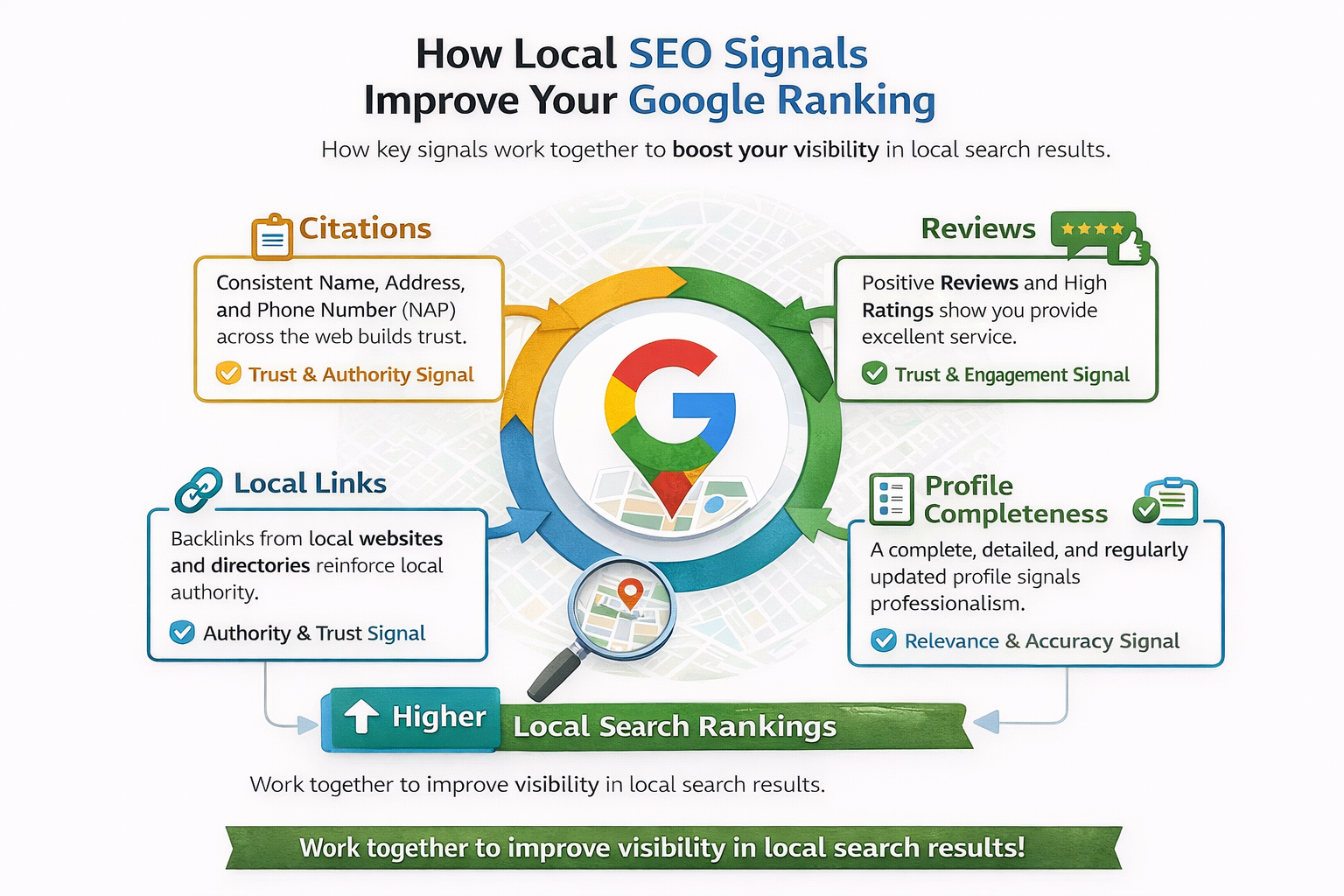
Once verified, your first priority is filling out every single field in your profile. Google rewards completeness. Profiles with comprehensive information rank higher in local search results and appear more trustworthy to potential customers.
Business name: Use your actual business name as it appears on your signage, website, and legal documents. Don’t stuff keywords into your business name like “Joe’s Plumbing | Best Emergency Plumber NYC.” Google penalizes this practice, and it looks unprofessional to customers.
Business category: Choose your primary category carefully because it’s the single most important ranking factor Google uses to determine which searches your profile appears in. Select the most specific category that accurately describes your core business. You can add secondary categories too, but your primary category should reflect what you do most.
Business address and service area: If customers visit a physical location, enter your full street address. If you’re a service area business like a contractor who travels to customers, hide your address and specify the cities, ZIP codes, or regions you serve instead. Be honest about your service area radius because showing up in searches 50 miles away wastes everyone’s time if you don’t actually service that area.
Phone number and website URL should be consistent across all online platforms. Google checks for NAP consistency (Name, Address, Phone number) across the web. Inconsistencies confuse Google and hurt your local search rankings. If your phone number is (845) 533-3309 on your website, it needs to be exactly that on your Google profile, not an alternate number or toll-free line.
Business hours: Update these regularly, especially for holidays. Nothing frustrates customers more than driving to your location during posted hours only to find you’re closed. Add special hours for holidays well in advance, and if you’re temporarily closed, mark your profile accordingly.
Business description: You have 750 characters to explain what makes your business unique. Write this for humans, not search engines. Focus on what problems you solve, what makes you different from competitors, and what customers can expect when they work with you. Mention your experience, specialties, and service area naturally.
If you’re building a comprehensive local seo strategy for your business, your Google Business Profile should be the centerpiece that ties everything together.
How Photos and Videos Transform Your Profile Performance
Visual content is not optional. Businesses with photos receive 42% more requests for driving directions and 35% more clicks to their websites compared to businesses without photos. Customers want to see what you look like, what your work looks like, and what they can expect before they contact you.
Upload at least 10-15 high-quality photos covering different aspects of your business. Include your logo, exterior and interior photos of your location, team photos, photos of your products or completed work, and action shots of your services being performed. Google recommends photos be at least 720 pixels wide by 540 pixels tall, in JPG or PNG format, and under 5MB in file size.
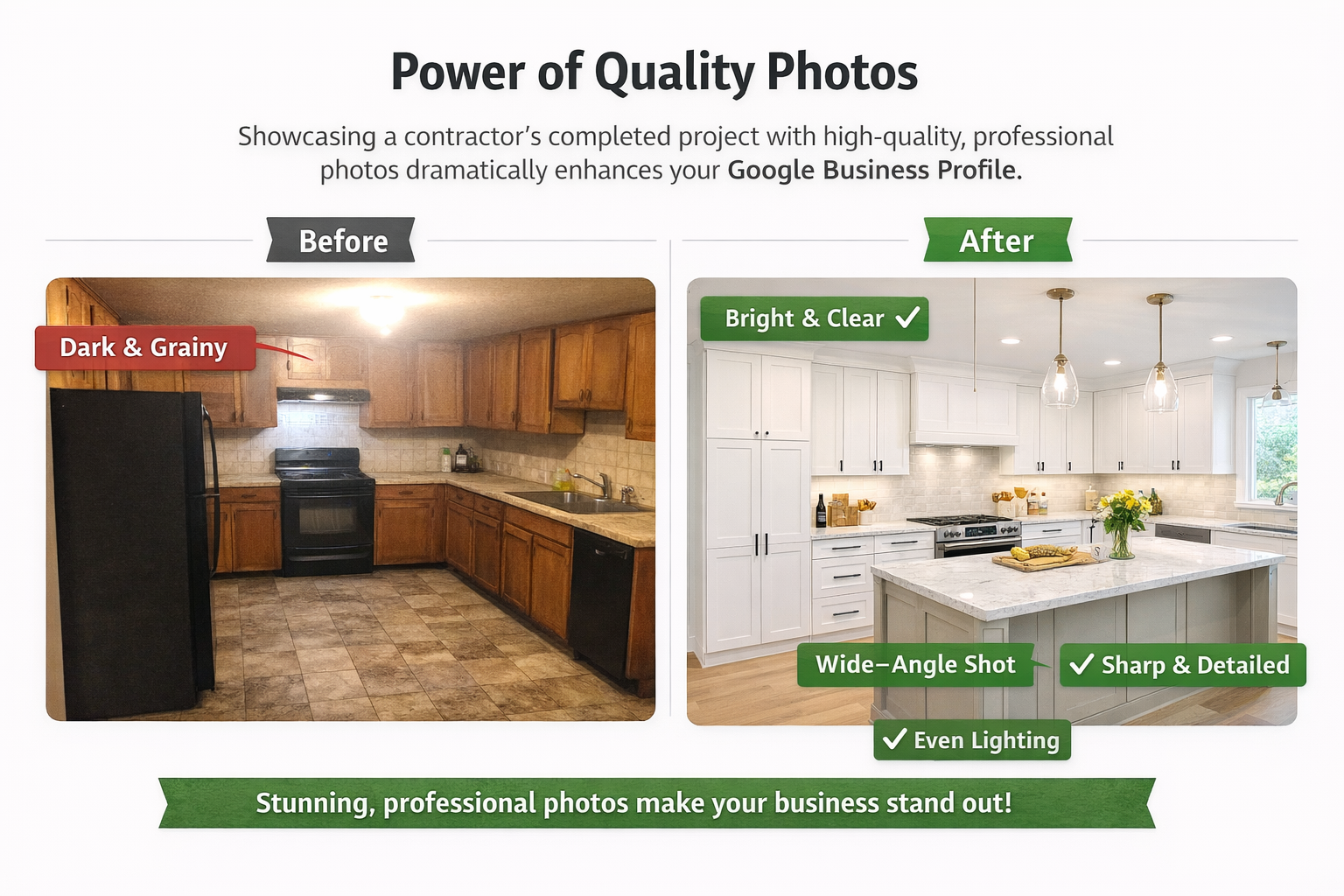
Quality matters more than quantity. Avoid grainy cell phone photos taken in poor lighting. If you’re a contractor, showcase your best before-and-after transformations. If you run a restaurant, show mouth-watering food shots. If you’re a service professional, show your team at work with real customers.
Update your photos regularly. Adding fresh images every few weeks signals to Google that your business is active. It also gives customers a current view of what you offer, which builds trust. Seasonal photos work particularly well, showing that you’re engaged with your business and community throughout the year.
Videos add another dimension to your profile. A 30-second video introducing your business, showing your process, or featuring customer testimonials can significantly increase engagement. Keep videos short, authentic, and focused on demonstrating value or building connection.
Why Customer Reviews Control Your Local Search Rankings
Reviews are the lifeblood of your Google Business Profile. They influence where you rank in local search results, whether customers choose to contact you, and what kind of leads you attract. The quantity, quality, and recency of your reviews all matter.
Approximately 88% of consumers trust online reviews as much as personal recommendations. A business with a 4.5-star rating and 50 reviews will typically outperform a business with a 5.0-star rating and only 5 reviews because the higher volume signals legitimacy and provides more data points for potential customers to evaluate.
The key is developing a systematic approach to getting reviews. Don’t wait for customers to leave reviews on their own because most satisfied customers won’t think to do it unless you ask. Create a process where you request reviews from every satisfied customer within 24-48 hours of completing the work or service.
Make it easy. Send customers a direct link to your review page. You can find this by going to your Google Business Profile dashboard, clicking on “Get more reviews” in the home section, and copying the short URL provided. Send this link via email, text message, or include it on invoices and receipts.
Never incentivize reviews with discounts or payments. Google explicitly prohibits this, and violating their guidelines can get your profile suspended. Instead, simply ask satisfied customers if they’d be willing to share their experience. Most people are happy to help a business they had a positive experience with.
Responding to reviews matters just as much as getting them. Reply to every review, both positive and negative, within 24-48 hours. Thank customers for positive reviews and address any concerns mentioned in negative reviews professionally and constructively. Your responses show potential customers how you handle feedback and demonstrate that you care about customer satisfaction.
When responding to negative reviews, never argue or make excuses. Acknowledge the customer’s concern, apologize if appropriate, explain what you’ll do differently, and offer to take the conversation offline to resolve the issue. Future customers reading your response will judge you on how you handle problems, not whether you occasionally receive criticism.
How Business Attributes and Special Features Increase Visibility
Google Business Profiles include dozens of attributes and features that help customers find exactly what they’re looking for. These range from accessibility features to payment methods to specific services you offer. The more relevant attributes you add, the more specific searches you’ll appear in.
Browse through the attributes section and check everything that applies to your business. If you’re wheelchair accessible, select that. If you offer free estimates, outdoor seating, or same-day service, mark those. Each attribute you add creates another opportunity for Google to match your business to a relevant search query.
Products and services: Use the products and services section to create a mini-catalog within your profile. Add detailed descriptions, prices (if appropriate), and photos for each service or product category you offer. This content is searchable, which means customers looking for specific services can find you even if those terms aren’t in your business description.
Questions and answers: The Q&A section lets potential customers ask questions directly on your profile, and anyone can answer them, including you. Don’t wait for questions to come in. Proactively post and answer the most common questions customers ask. This positions you as helpful and transparent while providing information that helps customers make decisions faster.
Booking button: If you use scheduling software, integrate it with your Google Business Profile to add a booking button directly to your listing. This removes friction from the conversion process, letting customers schedule appointments without leaving Google.
What Regular Posts and Updates Do for Your Profile
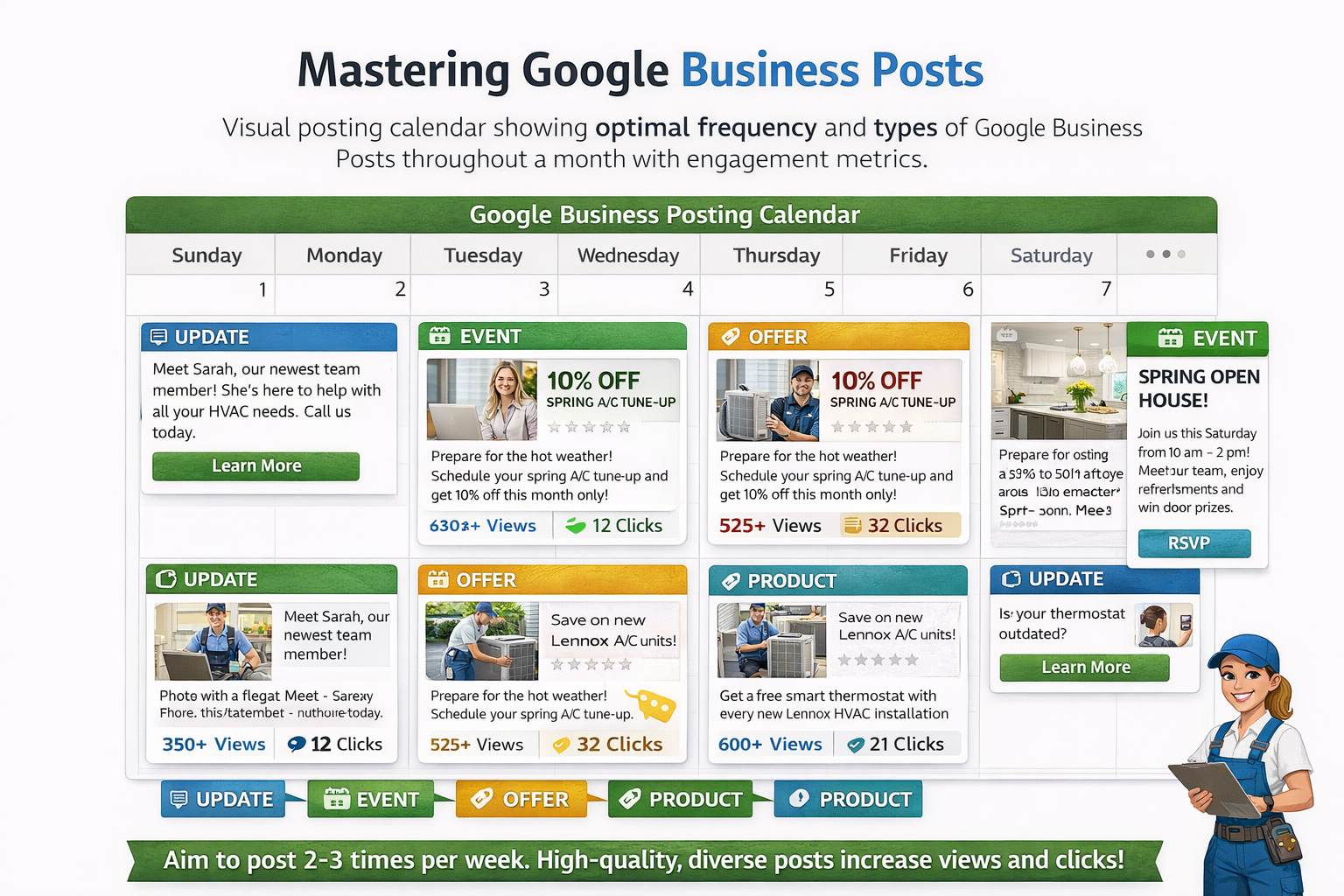
Google Business Posts work similarly to social media updates. They appear directly on your profile and in search results, letting you share news, offers, events, and updates with potential customers. Posts stay live for seven days (or until the event date for event posts), then archive.
Regular posting signals to Google that your business is active and engaged. It also gives you another opportunity to appear in search results because post content is indexed and searchable. Aim to publish at least one post per week, though two to three times per week is ideal.
Post types include updates (general news), offers (promotions or deals), events (upcoming happenings), and products (featured items or services). Mix up your post types to keep your profile fresh and engaging.
Each post should include an eye-catching photo, 100-300 words of text, and a clear call-to-action button (Learn More, Book, Order, Sign Up, etc.). Write posts that provide value rather than just promotional fluff. Share tips, highlight completed projects, introduce team members, or explain seasonal services.
How to Monitor Performance and Make Data-Driven Improvements
Your Google Business Profile dashboard includes built-in analytics called Insights. This data shows you exactly how customers find your profile, what actions they take, and where they come from. Use these insights to refine your optimization strategy over time.
Key metrics to track include how many people found your profile through direct searches (searching for your business name) versus discovery searches (searching for a category, product, or service). If most searches are direct, you need to work on category optimization and review generation. If discovery searches are high, your optimization is working.
Track which search queries customers used to find you. This information helps you understand what people are actually looking for and whether your category selections and business description align with real search behavior.
Monitor customer actions: How many people called you, requested directions, visited your website, or messaged you directly from your profile? Tracking these conversions helps you calculate the actual ROI of your optimization efforts.
Photo views are another important metric. If certain photos get significantly more views than others, create more content similar to your high-performing images. Businesses that regularly update their photos based on performance data see up to 40% higher engagement over time.
Set a recurring calendar reminder to review your Insights at least monthly. Look for trends, identify what’s working, and adjust your strategy accordingly. Optimization isn’t a one-time task but an ongoing process of refinement.
If you’re looking for additional tools to enhance your visibility, exploring the right seo plugins for contractors can complement your Google Business Profile strategy effectively.
How Building Citation Consistency Strengthens Your Local Presence
Your Google Business Profile doesn’t exist in isolation. Google cross-references information from your profile against hundreds of other sources across the web, including online directories, social media profiles, review sites, and industry-specific platforms. Consistent information across all these sources strengthens Google’s confidence in your business legitimacy.
Citations are online mentions of your business name, address, and phone number. The more consistent citations you have across reputable websites, the more authoritative your business appears to search engines. This directly impacts your local search rankings.
Start by claiming and optimizing your profiles on major directories like Yelp, Facebook, Bing Places, Apple Maps, and industry-specific platforms relevant to your business. Ensure your NAP information is identical everywhere. Even small variations like using “Street” versus “St.” or including a suite number in some places but not others can dilute your citation strength.
Getting listed on quality citations for contractors and other trade-specific directories helps reinforce your geographic relevance and industry authority.
Businesses with consistent citations across 50+ quality directories rank an average of 15-20% higher in local search results compared to businesses with fewer than 10 citations. The impact compounds over time as search engines gain more confidence in your business information.
Don’t just set up these profiles and forget them. Update them whenever your information changes, respond to reviews on each platform, and occasionally add fresh content to show your business remains active across the web.
Advanced Optimization Strategies That Separate Winners from Competition
Once you’ve covered the basics, several advanced strategies can give you an additional edge in competitive local markets.
Geographic keyword integration: While you shouldn’t keyword-stuff your business name, you should naturally incorporate local terms throughout your business description, services section, and posts. Mention neighborhood names, nearby landmarks, and the specific cities or regions you serve. This helps Google understand your geographic relevance for location-specific searches.
Competitor analysis: Search for your main keywords and see which competitors appear in the Local Pack. Analyze their profiles to identify what they’re doing well. Are they posting more frequently? Do they have more reviews? Better photos? Use this information to identify gaps in your own optimization.
Voice search optimization: More people are using voice search through smartphones and smart speakers. Voice queries tend to be longer and more conversational than typed searches. Optimize your Q&A section and business description to answer common questions in natural, conversational language.
Messaging features: Enable messaging on your profile so customers can contact you directly through Google. Respond to messages within minutes if possible. Quick response times improve customer satisfaction and may influence your ranking position.
Local link building: While technically outside your Google Business Profile, earning links from other local businesses, chambers of commerce, local news sites, and community organizations reinforces your local authority. These signals tell Google you’re an established, trusted part of your local business community.
Common Mistakes That Sabotage Your Google Business Profile
Even businesses that invest time in optimization often make preventable mistakes that undermine their efforts.
Inconsistent business hours: Nothing damages trust faster than showing up during your posted hours to find a business closed. Double-check your hours regularly, especially during holidays or after schedule changes.
Ignoring negative reviews: Some businesses avoid responding to negative reviews, hoping they’ll be forgotten. The opposite happens. An unanswered negative review sits there permanently, making you look either incompetent or like you don’t care about customer satisfaction.
Using stock photos: Generic stock photography makes your business look impersonal and untrustworthy. Customers want to see real photos of your actual business, team, and work. Authentic imagery significantly outperforms polished stock photos.
Incomplete service listings: Many businesses add a few services and stop. Take the time to list every service you offer with detailed descriptions. This creates more opportunities for Google to match your business to relevant searches.
Neglecting secondary categories: While your primary category is most important, you can add up to nine additional categories. Use them strategically to capture searches across all your service areas. A general contractor might include categories like kitchen remodeling, bathroom remodeling, and home renovation in addition to their primary general contractor category.
Letting your profile stagnate: Optimization isn’t a one-time project. Businesses that actively maintain their profiles with regular posts, fresh photos, and consistent engagement outperform those that set it up once and forget about it.
Frequently Asked Questions
How to optimize your Google Business Profile for local SEO?
Optimize your Google Business Profile by completing every field with accurate information, choosing the most specific primary category for your business, uploading 10-15 high-quality photos, actively requesting and responding to customer reviews, posting regular updates at least weekly, and ensuring your business information is consistent across all online directories. Focus on authenticity and completeness rather than keyword stuffing.
How to get more leads on Google local service ads?
Google Local Service Ads are separate from your Business Profile but complement it. To get more leads through LSAs, maintain a high rating through excellent customer service, respond to inquiries within minutes, keep your calendar updated to show availability, complete background checks and verification requirements, choose all relevant service categories you’re licensed for, and set your budget appropriately for your market. Your Google Business Profile reviews carry over to influence your LSA performance.
How to get more local business leads with SEO?
Generate more local leads through SEO by optimizing your Google Business Profile as your foundation, building consistent citations across quality directories, earning positive customer reviews regularly, creating location-specific content on your website, building relationships with other local businesses for link opportunities, ensuring your website is mobile-friendly and loads quickly, and monitoring your local search performance to identify and fix issues proactively. Local SEO is about establishing geographic relevance and trust.
How do you promote your business locally on Google?
Promote your business locally on Google by maintaining an optimized Business Profile, posting weekly updates highlighting your services and community involvement, running targeted Google Ads campaigns focused on your service area, encouraging satisfied customers to leave reviews, participating in local events and sharing them through your profile, creating content that answers common questions your local customers ask, and building partnerships with other local businesses for cross-promotion. Consistency and authenticity matter more than promotional tactics.
How do I make $100 a day with Google AdSense?
Making $100 daily with Google AdSense requires building a website with substantial traffic, typically 50,000 to 100,000 page views per month depending on your niche and ad placement strategy. This involves creating high-quality content that ranks well in search results, optimizing ad placement for click-through rates without violating AdSense policies, focusing on high-paying niches where advertisers bid more per click, and continuously growing your traffic through SEO and content marketing. This is separate from optimizing your Google Business Profile, which focuses on generating direct customer leads rather than ad revenue.
Taking Action: Your Path to More Local Leads
Your Google Business Profile is working for you right now, whether you’ve optimized it or not. The question is whether it’s working as hard as it could be. Every day you wait to optimize your profile is another day of lost opportunities, customers choosing competitors, and revenue walking out the door.
The businesses that dominate local search results didn’t get there by accident. They invested time in getting the details right, building trust through reviews and engagement, and consistently maintaining their online presence. You can do the same.
Start today with the most impactful changes: claim and verify your profile if you haven’t already, complete every field with accurate information, upload 10 high-quality photos, and create a system for requesting reviews from satisfied customers. These four steps alone will put you ahead of most competitors in your market.
Then commit to ongoing maintenance. Set aside 30 minutes per week to post updates, respond to reviews, and add fresh photos. Track your performance through Insights and adjust your approach based on real data. Optimization is a process, not a project.
If you need expert guidance tailored to your specific market and business type, GC Sherpa specializes in helping local service businesses dominate their local search results. We handle the technical complexity so you can focus on serving customers and growing your business. Call (845) 533-3309 today to discuss how we can optimize your Google Business Profile and build a complete local search strategy that generates consistent, qualified leads month after month.
Your competitors are already working on their profiles. Don’t let them capture the customers who should be calling you.